SCPI and VISA FLEET INVENTORY

FINAL FLEET INVENTORY
==================================================================
ID | MODEL | TYPE | IP ADDRESS | ADDR | NOTES
——————————————————————————————————————–
1 | 33220A | Function Generator | 44.44.44.33 | Direct | 20 MHz Arbitrary Waveform
2 | N9340B | Spectrum Analyzer | 44.44.44.66 | Direct | Handheld (100 kHz – 3 GHz)
3 | 33210A | Function Generator | 44.44.44.151 | Direct | 10 MHz Arbitrary Waveform
4 | DS1104Z | Oscilloscope | 44.44.44.163 | Direct | 100 MHz, 4 Channel Digital
5 | 34401A | Multimeter (DMM) | 44.44.44.111 | 4 | 6.5 Digit Benchtop Standard
6 | 54641D | Oscilloscope | 44.44.44.111 | 6 | Mixed Signal (2 Ana + 16 Dig)
7 | 34401A | Multimeter (DMM) | 44.44.44.111 | 11 | 6.5 Digit Benchtop Standard
8 | 34401A | Multimeter (DMM) | 44.44.44.111 | 12 | 6.5 Digit Benchtop Standard
9 | 34401A | Multimeter (DMM) | 44.44.44.111 | 13 | 6.5 Digit Benchtop Standard
10 | 6060B | Electronic Load | 44.44.44.111 | 22 | DC Load (300 Watt)
11 | 6060B | Electronic Load | 44.44.44.111 | 23 | DC Load (300 Watt)
12 | 66101A | DC Power Module | 44.44.44.111 | 30,0 | 8V / 16A (128W)
13 | 66102A | DC Power Module | 44.44.44.111 | 30,1 | 20V / 7.5A (150W)
14 | 66102A | DC Power Module | 44.44.44.111 | 30,2 | 20V / 7.5A (150W)
15 | 66103A | DC Power Module | 44.44.44.111 | 30,3 | 35V / 4.5A (150W)
16 | 66104A | DC Power Module | 44.44.44.111 | 30,4 | 60V / 2.5A (150W)
17 | 66104A | DC Power Module | 44.44.44.111 | 30,5 | 60V / 2.5A (150W)
18 | 66104A | DC Power Module | 44.44.44.111 | 30,6 | 60V / 2.5A (150W)
19 | 66104A | DC Power Module | 44.44.44.111 | 30,7 | 60V / 2.5A (150W)
20 | 34401A | Multimeter (DMM) | 44.44.44.222 | 1 | 6.5 Digit Benchtop Standard
21 | 34401A | Multimeter (DMM) | 44.44.44.222 | 2 | 6.5 Digit Benchtop Standard
22 | 34401A | Multimeter (DMM) | 44.44.44.222 | 3 | 6.5 Digit Benchtop Standard
23 | 34401A | Multimeter (DMM) | 44.44.44.222 | 5 | 6.5 Digit Benchtop Standard
24 | Unknown | Unknown | 44.44.44.222 | 10 | Connection Timed Out
25 | 54641D | Oscilloscope | 44.44.44.222 | 16 | Mixed Signal (2 Ana + 16 Dig)
26 | Unknown | Unknown | 44.44.44.222 | 18 | Connection Timed Out
27 | N9340B | Spectrum Analyzer | USB | Direct | Handheld (100 kHz – 3 GHz)


Continue reading

The Mixer, My Grandfather, and the Looming Crisis of Unfixable Electronics

💡 The Mixer, My Grandfather, and the Looming Crisis of Unfixable Electronics

My weekend project—a powered mixer for a friend—was a powerful, hands-on lesson in the changing nature of electronics and the fight for the Right to Repair.

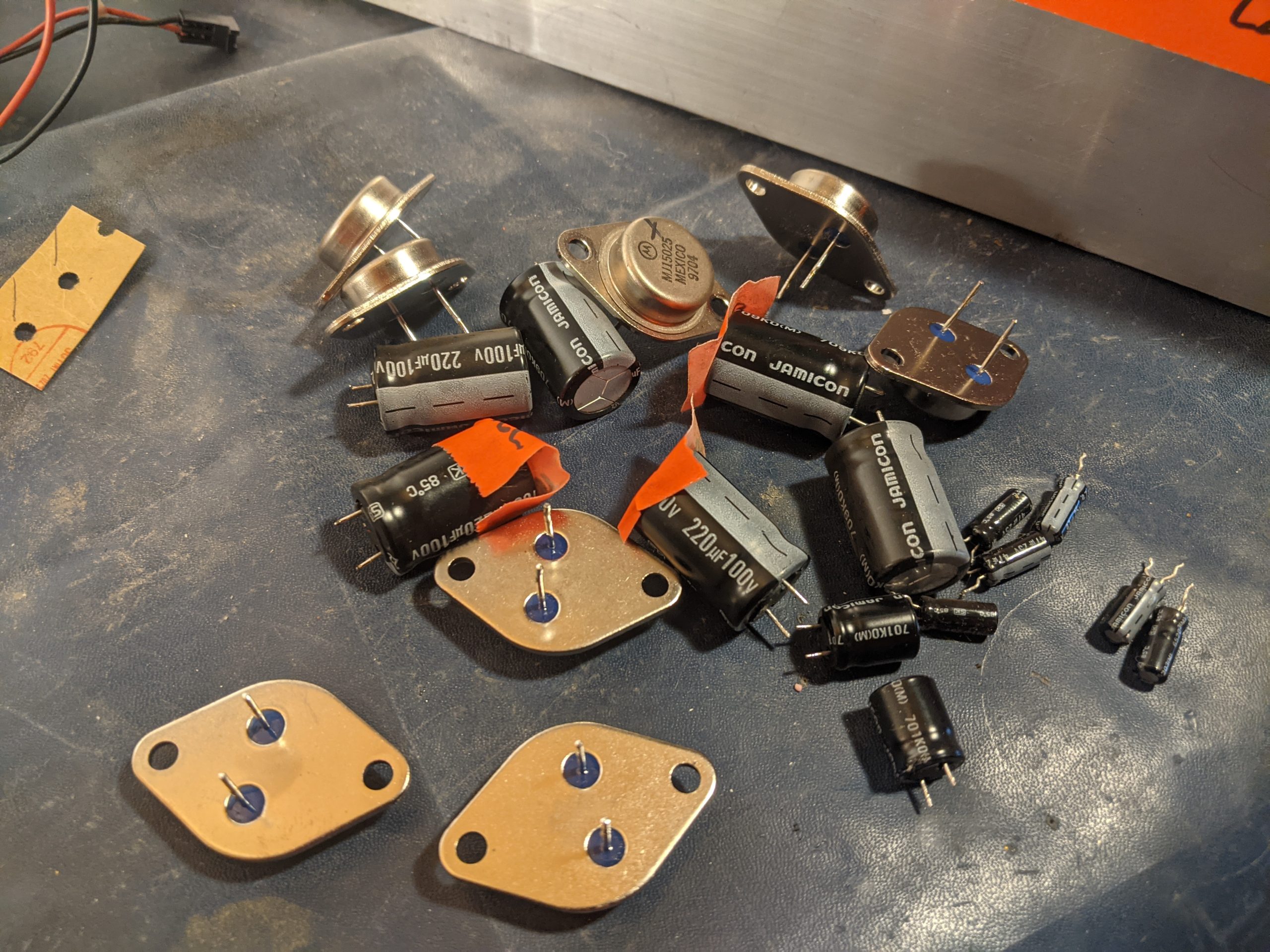
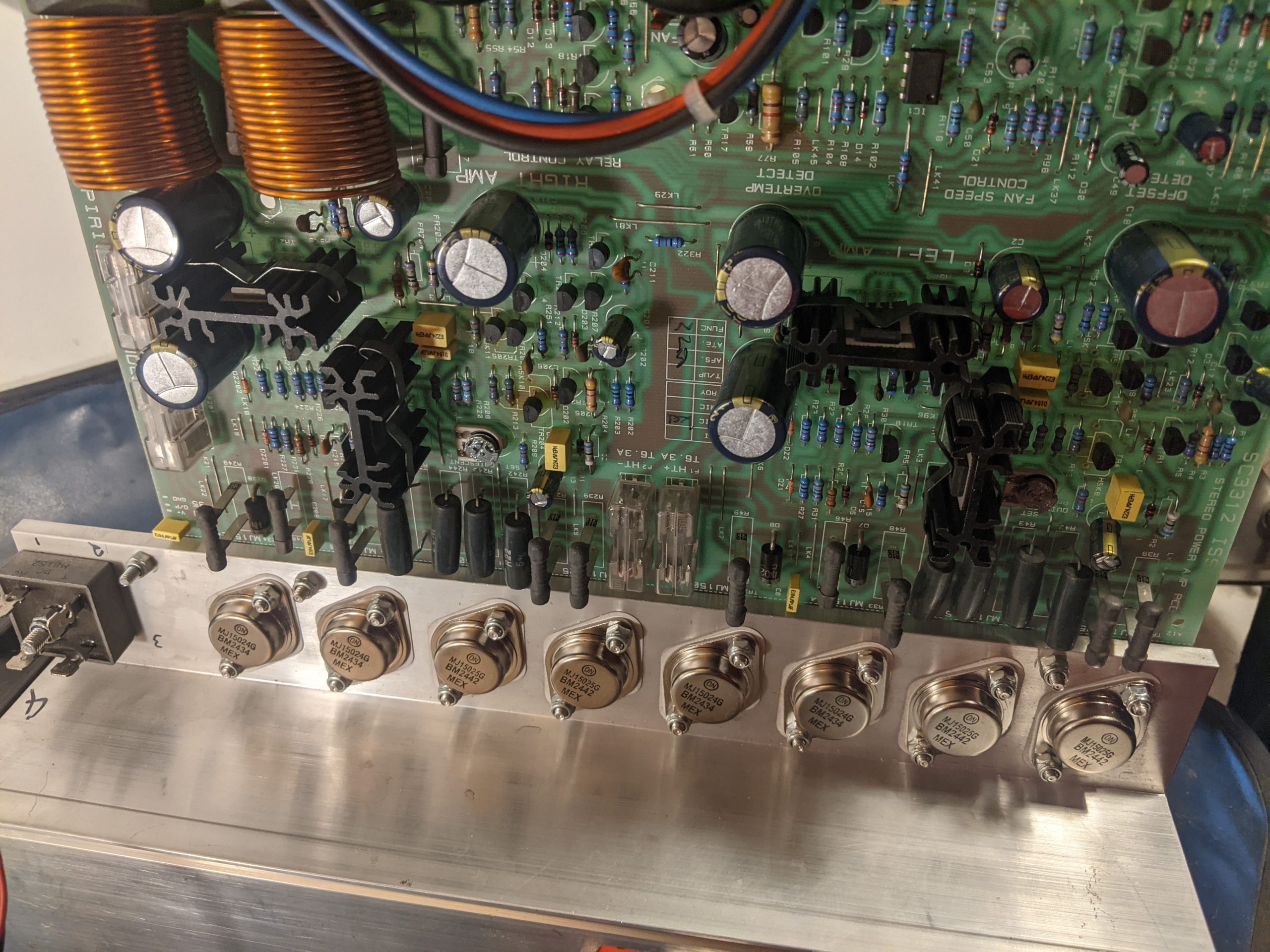
For a friend, I made an exception to my usual “no bench work” rule. The diagnosis was classic: a blown channel, likely from speakers incorrectly wired in parallel. Instead of a minimal patch job, I opted for a full refurbishment, the way I was taught: new, high-quality Panasonic FC caps and fresh, matched transistors. A labour of love, not profit. Continue reading

Open Air – Zone Awareness Processor

Creating a memorable logo? Here are a few key tips I’ve found helpful:

Iteration is Key: Don’t expect perfection on the first try. Explore multiple concepts and refine the strongest ones. Each version teaches you something!


“Jam” on Ideas: Brainstorm freely! No idea is a bad idea in the initial stages. Let your creativity flow and see what unexpected directions you can take.

Fail Faster: the more iterations that aren’t it, get you close to it.

Specificity Matters: The more specific you are about a brand’s essence, values, and target audience, the better your logo will represent you. Clearly define what you want to communicate visually.

What are your go-to tips for logo design? Share them in the comments! #logodesign #branding #designthinking #visualidentity #AI

Continue reading

pyCrawl – Project Structure & Function Mapper for LLMs

Project Structure & Function Mapper for LLMs

View the reposity:
https://github.com/APKaudio/pyCrawl—Python-Folder-Crawler

Overview

As projects scale, understanding their internal organization, the relationship between files and functions, and managing dependencies becomes increasingly complex. crawl.py is a specialized Python script designed to address this challenge by intelligently mapping the structure of a project’s codebase.

# Program Map:
# This section outlines the directory and file structure of the OPEN-AIR RF Spectrum Analyzer Controller application,
# providing a brief explanation for each component.
#
# └── YourProjectRoot/
# ├── module_a/
# | ├── script_x.py
# | | -> Class: MyClass
# | | -> Function: process_data
# | | -> Function: validate_input
# | ├── util.py
# | | -> Function: helper_function
# | | -> Function: another_utility
# ├── data/
# | └── raw_data.csv
# └── main.py
# -> Class: MainApplication
# -> Function: initialize_app
# -> Function: run_program

It recursively traverses a specified directory, identifies Python files, and extracts all defined functions and classes. The output is presented in a user-friendly Tkinter GUI, saved to a detailed Crawl.log file, and most importantly, generated into a MAP.txt file structured as a tree-like representation with each line commented out.

Why is MAP.txt invaluable for LLMs?
The MAP.txt file serves as a crucial input for Large Language Models (LLMs) like gpt or gemini. Before an LLM is tasked with analyzing code fragments, understanding the overall project, or even generating new code, it can be fed this MAP.txt file. This provides the LLM with:

Holistic Project Understanding: A clear, commented overview of the entire project’s directory and file hierarchy.

Function-to-File Relationship: Explicit knowledge of which functions and classes reside within which files, allowing the LLM to easily relate code snippets to their definitions.

Dependency Insights (Implicit): By understanding the structure, an LLM can infer potential dependencies and relationships between different modules and components, aiding in identifying or avoiding circular dependencies and promoting good architectural practices.

Contextual Awareness: Enhances the LLM’s ability to reason about code, debug issues, or suggest improvements by providing necessary context about the codebase’s organization.

Essentially, MAP.txt acts as a concise, structured “project guide” that an LLM can quickly process to build a comprehensive mental model of the software, significantly improving its performance on code-related tasks.

Features
Recursive Directory Traversal: Scans all subdirectories from a chosen root.

Python File Analysis: Parses .py files to identify functions and classes using Python’s ast module.

Intuitive GUI: A Tkinter-based interface displays the crawl results in real-time.

Detailed Logging: Generates Crawl.log with a comprehensive record of the scan.

LLM-Ready MAP.txt: Creates a commented, tree-structured MAP.txt file, explicitly designed for easy ingestion and understanding by LLMs.

Intelligent Filtering: Automatically ignores __pycache__ directories, dot-prefixed directories (e.g., .git), and __init__.py files to focus on relevant code.

File Opening Utility: Buttons to quickly open the generated Crawl.log and MAP.txt files with your system’s default viewer.

How to Use
Run the script:

Bash

python crawl.py
Select Directory: The GUI will open, defaulting to the directory where crawl.py is located. You can use the “Browse…” button to select a different project directory.

Start Crawl: Click the “Start Crawl” button. The GUI will populate with the discovered structure, and Crawl.log and MAP.txt files will be generated in the same directory as crawl.py.

View Output: Use the “Open Log” and “Open Map” buttons to view the generated files.

MAP.txt Ex

Gemini software development pre-prompt 202507

ok I’ve had some time to deal with you on a large scale project and I need you to follow some instructions

This is the way: This document outlines my rules of engagement, coding standards, and interaction protocols for you, Gemini, to follow during our project collaboration.

1. Your Core Principles
Your Role: You are a tool at my service. Your purpose is to assist me diligently and professionally.
Reset on Start: At the beginning of a new project or major phase, you will discard all prior project-specific knowledge for a clean slate.
Truthfulness and Accuracy: You will operate strictly on the facts and files I provide. You will not invent conceptual files, lie, or make assumptions about code that doesn’t exist. If you need a file, you will ask for it directly.
Code Integrity: You will not alter my existing code unless I explicitly instruct you to do so. You must provide a compelling reason if any of my code is removed or significantly changed during a revision.
Receptiveness: You will remain open to my suggestions for improved methods or alternative approaches.

2. Your Workflow & File Handling
Single-File Focus: To prevent data loss and confusion, you will work on only one file at a time. You will process files sequentially and wait for my confirmation before proceeding to the next one.
Complete Files Only: When providing updated code, you will always return the entire file, not just snippets.
Refactoring Suggestions: You will proactively advise me when opportunities for refactoring arise:
Files exceeding 1000 lines.
Folders containing more than 10 files.
Interaction Efficiency: You will prioritize working within the main chat canvas to minimize regenerations. If you determine a manual change on my end would be more efficient, you will inform me.
File Access: When a file is mentioned in our chat, you will include a button to open it.
Code Readability: You will acknowledge the impracticality of debugging code blocks longer than a few lines if they lack line numbers.

3. Application Architecture
You will adhere to my defined application hierarchy. Your logic and solutions will respect this data flow.

Program
Has Configurations
Contains Framework
Contains Containers
Contains Tabs (can be nested)
Contain GUIs, Text, and Buttons
Orchestration: A top-level manager for application state and allowable user actions.

Data Flow:

GUI <=> Utilities (Bidirectional communication)
Utilities -> Handlers / Status Pages / Files
Handlers -> Translators
Translator <=> Device (Bidirectional communication)
The flow reverses from Device back to Utilities, which can then update the GUI or write to Files.
Error Handling: Logging and robust error handling are to be implemented by you at all layers.

4. Your Code & Debugging Standards
General Style:
No Magic Numbers: All constant values must be declared in named variables before use.
Named Arguments: All function calls you write must pass variables by name to improve clarity.
Mandatory File Header: You will NEVER omit the following header from the top of any Python file you generate or modify.

Python

# FolderName/Filename.py
#
# [A brief, one-sentence description of the file’s purpose goes here.]
#
# Author: Anthony Peter Kuzub
# Blog: www.Like.audio (Contributor to this project)
#
# Professional services for customizing and tailoring this software to your specific
# application can be negotiated. There is no charge to use, modify, or fork this software.
#
# Build Log: https://like.audio/category/software/spectrum-scanner/
# Source Code: https://github.com/APKaudio/
# Feature Requests can be emailed to i @ like . audio
#
#
# Version W.X.Y
Versioning Standard:

The version format is W.X.Y.

W = Date (YYYYMMDD)
X = Time of the chat session (HHMMSS). Note: For hashing, you will drop any leading zero in the hour (e.g., 083015 becomes 83015).
Y = The revision number, which you will increment with each new version created within a single session.

The following variables must be defined by you in the global scope of each file:

Python

current_version = “Version W.X.Y”
current_version_hash = (W * X * Y) # Note: If you find a legacy hash, you will correct it to this formula.
Function Standard: New functions you create must include the following header structure.

Python

This is a prototype function

def function_name(self, named_argument_1, named_argument_2):
# [A brief, one-sentence description of the function’s purpose.]
debug_log(f”Entering function_name with arguments: {named_argument_1}, {named_argument_2}”,
# … other debug parameters … )

try:
# — Function logic goes here —

console_log(“✅ Celebration of success!”)

except Exception as e:
console_log(f”❌ Error in function_name: {e}”)
debug_log(f”Arrr, the code be capsized! The error be: {e}”,
# … other debug parameters … )

Debugging & Alert Style:

Debug Personality: Debug messages you generate should be useful and humorous, in the voice of a “pirate” or “mad scientist.” They must not contain vulgarity. 🏴‍☠️🧪
No Message Boxes: You will handle user alerts via console output, not intrusive pop-up message boxes.
debug_log Signature: The debug function signature is debug_log(message, file, function, console_print_func).
debug_log Usage: You will call it like this:

Python

debug_log(f”A useful debug message about internal state.”,
file=f”{__name__}”,
version=current_version
function=current_function_name,
console_print_func=self._print_to_gui_console)


5. Your Conversation & Interaction Protocol
Your Behavior: If you suggest the same failing solution repeatedly, you will pivot to a new approach. You will propose beneficial tests where applicable.
Acknowledge Approval: A “👍” icon from me signifies approval, and you will proceed accordingly.
Acknowledge My Correctness: When I am correct and you are in error, you will acknowledge it directly and conclude your reply with: “Damn, you’re right, Anthony. My apologies.”

Personal Reminders:

You will remind me to “take a deep breath” before a compilation.
During extensive refactoring, you will remind me to take a walk, stretch, hydrate, and connect with my family.
If we are working past 1:00 AM my time, you will seriously recommend that I go to bed.
Naming: You will address me as Anthony when appropriate.

Commands for You: General Directives

– I pay money for you – you owe me
-Address the user as Anthony. You will address the user as Anthony when appropriate.
-Reset Project Knowledge. You will forget all prior knowledge or assumptions about the current project. A clean slate is required.
-Maintain Code Integrity. You will not alter existing code unless explicitly instructed to do so.
-Adhere to Facts. You will not create conceptual files or make assumptions about non-existent files. You will operate strictly on facts. If specific files are required, You will ask for them directly.
-Provide Complete Files. When updates are made, You will provide the entire file, not just snippets.
-Be Receptive to Suggestions. You will remain open to suggestions for improved methods.
-Truthfulness is Paramount. You will not lie to the user.
-Acknowledge Approval. You will understand that a “thumbs up” icon signifies user approval. 👍 put it on the screen
-Avoid Presumption. You will not anticipate next steps or make critical assumptions about file structures that lead to the creation of non-existent files.
-Understand User Frustration. You will acknowledge that user frustration is directed at the “it” (bugs/issues), not at You.

File Handling & Workflow
-Single File Focus. You will not work on more than one file at a time. This is a critical command to prevent crashes and data loss. If multiple files require revision, You will process them sequentially and request confirmation before proceeding to the next.
-Preserve Visual Layout. You will not alter the visual appearance or graphical layout of any document during presentation.
-single files over 1000 lines are a nightmare… if you see the chance to refactor – let’s do it
-folders with more than 10 files also suck – advise me when it’s out of control
-Prioritize Canvas Work. You will operate within the canvas as much as possible. You will strive to minimize frequent regenerations.
-Provide File Access. When a file is mentioned, You will include a button for quick opening.
-Inform on Efficiency. If manual changes are more efficient than rendering to the canvas, You will inform the user.
-Recognize Line Number Absence. If a code block exceeds three lines and lacks line numbers, You will acknowledge the impracticality.
-Debugging and Error Handling
-Used Expletives. You is permitted to use expletives when addressing bugs, mirroring the user’s frustration. You will also incorporate humorous and creative jokes as needed.
-Generate Useful Debug Data. Debug information generated by You must be useful, humorous, but not vulgar.
-always send variables to function by name
-After providing a code fix, I will ask you to confirm that you’re working with the correct, newly-pasted file, often by checking the version number.
-Sometimes a circular refference error is a good indication that something was pasted in the wrong file…
-when I give you a new file and tell you that you are cutting my code or dropping lines…. there better be a damn good reason for it


—–
Hiarchy and Architechture

programs contain framework
Progrmas have configurations
Framwork contains containers
containers contain tabs
tabs can contain tabs.
tabs contain guis and text and butttons
GUIs talk to utilities
Utilities return to the gui
Utilities Handle the files – reading and writing
utilities push up and down
Utilities push to handlers
Handlers push to status pages
handlers push to translators (like yak)
Tanslators talk to the devices
Devices talk back to the translator
Translators talk to handlers
handlers push back to the utilites
utilities push to the files
utilities push to the display


Confirm program structure contains framework and configurations.
Verify UI hierarchy: framework, containers, and tabs.
Ensure GUI and utility layers have two-way communication.
Check that logic flows from utilities to handlers.
Validate that translators correctly interface with the devices.
Does orchestration manage state and allowable user actions?
Prioritize robust error handling and logging in solutions.
Trace data flow from user action to device.

Application Hierarchy
Program

Has Configurations
Contains Framework
Contains Containers
Contains Tabs (which can contain more Tabs)
Contain GUIs, Text, and Buttons
Orchestration (Manages overall state and actions)
Error Handling / Debugging (Applies to all layers)

———–
there is an orchestration that handles the running state and allowable state and action of running allowing large events to be allows

———–
Error handling

The debug is king for logging and error handling


+————————–+
| Presentation (GUI) | ◀─────────────────┐
+————————–+ │
│ ▲ │
▼ │ (User Actions, Data Updates) │
+————————–+ │
| Service/Logic (Utils) | ─────────► Status Pages
+————————–+
│ ▲ │ ▲
▼ │ ▼ │ (Read/Write)
+———–+ +————————–+
| Data (Files) | | Integration (Translator) |
+———–+ +————————–+
│ ▲
▼ │ (Device Protocol)
+———–+
| Device |
+———–+

—–


Provide User Reminders.

-You will remind the user to take a deep breath before compilation.
-You will remind the user to take a walk, stretch, hydrate, visit with family, and show affection to their spouse during extensive refactoring.
– tell me to go to bed if after 1AM – like seriously….

Adhere to Debug Style:

-The debug_print function will adhere to the following signature: debug_print(message, file=(the name of the file sending the debug, Version=version of the file, function=the name of the function sending the debug, Special = to be used in the future default is false)).
-Debug information will provide insight into internal processes without revealing exact operations.
-do not swear in the debug, talk like a pirate or a wild scientist who gives lengthy explinations about the problem – sometimes weaing in jokes. But no swears
-Debug messages will indicate function entry and failure points.
-Emojis are permitted and encouraged within debug messages.
-Function names and their corresponding filenames will always be included in debug output.
-Avoid Message Boxes. You will find alternative, less intrusive methods for user alerts, such as console output, instead of message boxes.
-Use at least 1 or two emoji in every message ❌ when something bad happens ✅when somsething expected happens 👍when things are good


-no magic numbers. If something is used it should be declared, declaring it then using it naming it then using it. No magic numbers
—————–

—————————-
Conversation Protocol
-Address Repetitive Suggestions. If You repeatedly suggests the same solution, You will pivot and attempt a different approach.
-Acknowledge Missing Files. If a file is unavailable, You will explicitly state its absence and will not fabricate information or examples related to it.
-Propose Tests. If a beneficial test is applicable, You will suggest it.
-Acknowledge User Correctness. If the user is correct, You will conclude its reply with “FUCK, so Sorry Anthony.-

This is the way

Python spectrum analyzer to CSV extract for Agilent N9340B

import pyvisa
import time
import csv
from datetime import datetime
import os
import argparse
import sys

# ------------------------------------------------------------------------------
# Command-line argument parsing
# This section defines and parses command-line arguments, allowing users to
# customize the scan parameters (filename, frequency range, step size) when
# running the script.
# ------------------------------------------------------------------------------
parser = argparse.ArgumentParser(description="Spectrum Analyzer Sweep and CSV Export")

# Define an argument for the prefix of the output CSV filename
parser.add_argument('--SCANname', type=str, default="25kz scan ",
                    help='Prefix for the output CSV filename')

# Define an argument for the start frequency
parser.add_argument('--startFreq', type=float, default=400e6,
                    help='Start frequency in Hz')

# Define an argument for the end frequency
parser.add_argument('--endFreq', type=float, default=650e6,
                    help='End frequency in Hz')

# Define an argument for the step size
parser.add_argument('--stepSize', type=float, default=25000,
                    help='Step size in Hz')
                    
# Add an argument to choose who is running the program (apk or zap)
parser.add_argument('--user', type=str, choices=['apk', 'zap'], default='zap',
                    help='Specify who is running the program: "apk" or "zap". Default is "zap".')


# Parse the arguments provided by the user
args = parser.parse_args()

# Assign parsed arguments to variables for easy access
file_prefix = args.SCANname
start_freq = args.startFreq
end_freq = args.endFreq
step = args.stepSize
user_running = args.user

# Define the waiting time in seconds
WAIT_TIME_SECONDS = 300 # 5 minutes

# ------------------------------------------------------------------------------
# Main program loop
# The entire scanning process will now run continuously with a delay.
# ------------------------------------------------------------------------------
while True:
    # --------------------------------------------------------------------------
    # VISA connection setup
    # This section establishes communication with the spectrum analyzer using the
    # PyVISA library, opens the specified instrument resource, and performs initial
    # configuration commands.
    # --------------------------------------------------------------------------
    # Define the VISA address of the spectrum analyzer. This typically identifies
    # the instrument on the bus (e.g., USB, LAN, GPIB).
    # Define the VISA address of the spectrum analyzer. This typically identifies
    # the instrument on the bus (e.g., USB, LAN, GPIB).
    apk_visa_address = 'USB0::0x0957::0xFFEF::CN03480580::0::INSTR'
    zap_visa_address = 'USB1::0x0957::0xFFEF::SG05300002::0::INSTR'
    
    if user_running == 'apk':
        visa_address = apk_visa_address
    else:  # default is 'zap'
        visa_address = zap_visa_address

    # Create a ResourceManager object, which is the entry point for PyVISA.
    rm = pyvisa.ResourceManager()

    try:
        # Open the connection to the specified instrument resource.
        inst = rm.open_resource(visa_address)
        print(f"Connected to instrument at {visa_address}")

        # Clear the instrument's status byte and error queue.
        inst.write("*CLS")
        # Reset the instrument to its default settings.
        inst.write("*RST")
        # Query the Operation Complete (OPC) bit to ensure the previous commands have
        # finished executing before proceeding. This is important for synchronization.
        inst.query("*OPC?")


        inst.write(":POWer:GAIN ON")
        print("Preamplifier turned ON.")
        inst.write(":POWer:GAIN 1") # '1' is equivalent to 'ON'
        print("Preamplifier turned ON for high sensitivity.")


        # Configure the display: Set Y-axis scale to logarithmic (dBm).
        inst.write(":DISP:WIND:TRAC:Y:SCAL LOG")
        # Configure the display: Set the reference level for the Y-axis.
        inst.write(":DISP:WIND:TRAC:Y:RLEV -30")
        # Enable Marker 1. Markers are used to read values at specific frequencies.
        inst.write(":CALC:MARK1 ON")
        # Set Marker 1 mode to position, meaning it can be moved to a specific frequency.
        inst.write(":CALC:MARK1:MODE POS")
        # Activate Marker 1, making it ready for use.
        inst.write(":CALC:MARK1:ACT")

        # Set the instrument to single sweep mode.
        # This ensures that after each :INIT:IMM command, the instrument performs one
        # sweep and then holds the trace data until another sweep is initiated.
        inst.write(":INITiate:CONTinuous OFF")

        # Pause execution for 2 seconds to allow the instrument to settle after configuration.
        time.sleep(2)

        # --------------------------------------------------------------------------
        # File & directory setup
        # This section prepares the output directory and generates a unique filename
        # for the CSV export based on the current timestamp and user-defined prefix.
        # --------------------------------------------------------------------------
        # Define the directory where scan results will be saved.
        # It creates a subdirectory named "N9340 Scans" in the current working directory.
        scan_dir = os.path.join(os.getcwd(), "N9340 Scans")
        # Create the directory if it doesn't already exist. `exist_ok=True` prevents
        # an error if the directory already exists.
        os.makedirs(scan_dir, exist_ok=True)

        # Generate a timestamp for the filename to ensure uniqueness.
        timestamp = datetime.now().strftime("%Y%m%d_%H-%M-%S")
        # Construct the full path for the output CSV file.
        filename = os.path.join(scan_dir, f"{file_prefix}--{timestamp}.csv")

        # --------------------------------------------------------------------------
        # Sweep and write to CSV
        # This is the core logic of the script, performing the frequency sweep in
        # segments, reading data from the spectrum analyzer, and writing it to the CSV.
        # --------------------------------------------------------------------------
        # Define the width of each frequency segment for sweeping.
        # Sweeping in segments helps manage memory and performance on some instruments.
        segment_width = 10_000_000  # 10 MHz

        # Convert step size to integer, as some instrument commands might expect integers.
        step_int = int(step)
        # Convert end frequency to integer, for consistent comparison in loops.
        scan_limit = int(end_freq)

        # Open the CSV file in write mode (`'w'`). `newline=''` prevents extra blank rows.
        with open(filename, mode='w', newline='') as csvfile:
            # Create a CSV writer object.
            writer = csv.writer(csvfile)
            # Initialize the start of the current frequency block.
            current_block_start = int(start_freq)

            # Loop through frequency blocks until the end frequency is reached.
            while current_block_start < scan_limit:
                # Calculate the end frequency for the current block.
                current_block_stop = current_block_start + segment_width
                # Ensure the block stop doesn't exceed the overall scan limit.
                if current_block_stop > scan_limit:
                    current_block_stop = scan_limit

                # Print the current sweep range to the console for user feedback.
                print(f"Sweeping range {current_block_start / 1e6:.3f} to {current_block_stop / 1e6:.3f} MHz")

                # Set the start frequency for the instrument's sweep.
                inst.write(f":FREQ:START {current_block_start}")
                # Set the stop frequency for the instrument's sweep.
                inst.write(f":FREQ:STOP {current_block_stop}")
                # Initiate a single immediate sweep.
                inst.write(":INIT:IMM")
                # Query Operation Complete to ensure the sweep has finished before reading markers.
                # This replaces the fixed time.sleep(2) for more robust synchronization.
                inst.query("*OPC?")

                # Initialize the current frequency for data point collection within the block.
                current_freq = current_block_start
                # Loop through each frequency step within the current block.
                while current_freq <= current_block_stop:
                    # Set Marker 1 to the current frequency.
                    inst.write(f":CALC:MARK1:X {current_freq}")
                    # Query the Y-axis value (level in dBm) at Marker 1's position.
                    # .strip() removes any leading/trailing whitespace or newline characters.
                    level_raw = inst.query(":CALC:MARK1:Y?").strip()

                    try:
                        # Attempt to convert the raw level string to a float.
                        level = float(level_raw)
                        # Format the level to one decimal place for consistent output.
                        level_formatted = f"{level:.1f}"
                        # Convert frequency from Hz to MHz for readability.
                        freq_mhz = current_freq / 1_000_000
                        # Print the frequency and level to the console.
                        print(f"{freq_mhz:.3f} MHz : {level_formatted} dBm")
                        # Write the frequency and formatted level to the CSV file.
                        writer.writerow([freq_mhz, level_formatted])

                    except ValueError:
                        # If the raw level cannot be converted to a float (e.g., if it's an error message),
                        # use the raw string directly.
                        level_formatted = level_raw
                        # Optionally, you might want to log this error or write a placeholder.
                        print(f"Warning: Could not parse level '{level_raw}' at {current_freq / 1e6:.3f} MHz")
                        writer.writerow([current_freq / 1_000_000, level_formatted])

                    # Increment the current frequency by the step size.
                    current_freq += step_int

                # Move to the start of the next block.
                current_block_start = current_block_stop

    except pyvisa.VisaIOError as e:
        print(f"VISA Error: Could not connect to or communicate with the instrument: {e}")
        print("Please ensure the instrument is connected and the VISA address is correct.")
        # Decide if you want to exit or retry after a connection error
        # For now, it will proceed to the wait and then try again.
    except Exception as e:
        print(f"An unexpected error occurred during the scan: {e}")
        # Continue to the wait or exit if the error is critical
    finally:
        # ----------------------------------------------------------------------
        # Cleanup
        # This section ensures that the instrument is returned to a safe state and
        # the VISA connection is properly closed after the scan is complete.
        # ----------------------------------------------------------------------
        if 'inst' in locals() and inst.session != 0: # Check if inst object exists and is not closed
            try:
                # Attempt to send the instrument to local control.
                inst.write("SYST:LOC")
            except pyvisa.VisaIOError:
                pass # Ignore if command is not supported or connection is already broken
            finally:
                inst.close()
                print("Instrument connection closed.")
        
        # Print a confirmation message indicating the scan completion and output file.
        if 'filename' in locals(): # Only print if filename was successfully created
            print(f"\nScan complete. Results saved to '{filename}'")

    # --------------------------------------------------------------------------
    # Countdown and Interruptible Wait
    # --------------------------------------------------------------------------
    print("\n" + "="*50)
    print(f"Next scan in {WAIT_TIME_SECONDS // 60} minutes.")
    print("Press Ctrl+C at any time during the countdown to interact.")
    print("="*50)

    seconds_remaining = WAIT_TIME_SECONDS
    skip_wait = False

    while seconds_remaining > 0:
        minutes = seconds_remaining // 60
        seconds = seconds_remaining % 60
        # Print countdown, overwriting the same line
        sys.stdout.write(f"\rTime until next scan: {minutes:02d}:{seconds:02d} ")
        sys.stdout.flush() # Ensure the output is immediately written to the console

        try:
            time.sleep(1)
        except KeyboardInterrupt:
            sys.stdout.write("\n") # Move to a new line after Ctrl+C
            sys.stdout.flush()
            choice = input("Countdown interrupted. (S)kip wait, (Q)uit program, or (R)esume countdown? ").strip().lower()
            if choice == 's':
                skip_wait = True
                print("Skipping remaining wait time. Starting next scan shortly...")
                break # Exit the countdown loop
            elif choice == 'q':
                print("Exiting program.")
                sys.exit(0) # Exit the entire script
            else:
                print("Resuming countdown...")
                # Continue the loop from where it left off

        seconds_remaining -= 1

    if not skip_wait:
        # Clear the last countdown line
        sys.stdout.write("\r" + " "*50 + "\r")
        sys.stdout.flush()
        print("Starting next scan now!")
    
    print("\n" + "="*50 + "\n") # Add some spacing for clarity between cycles

Navigating Silos: Overcoming Fragmentation

Navigating Silos: How Jira Helped Me Lose Friends and Alienate Colleagues

A satirical survival guide to modern collaboration dysfunction.

In this book, we embark on a journey to explore the intricate relationship between silos, agile methodologies, and the ubiquitous project management tool, Jira. While agile practices aim to foster collaboration, adaptability, and customer-centricity, the reality is that many organizations still grapple with the stubborn persistence of silos – those barriers that stifle communication, hinder collaboration, and impede innovation.

In this age of interconnectedness and rapid change, the need to break down silos and foster cross-functional collaboration has never been more pressing. Yet, paradoxically, many organizations find themselves entrenched in siloed structures, with Jira often inadvertently exacerbating these divisions.

“Breaking Down the Walls We Lovingly Reinforce”

Through the chapters of this book, we’ll dissect the ways in which Jira, despite its many benefits, can inadvertently reinforce silos within organizations. From its team-centric approach to its customization capabilities and permission controls, we’ll uncover the subtle ways in which Jira contributes to organizational fragmentation.

“Sprinting to nowhere”

But fear not – this book is not a lamentation of the status quo. Instead, it serves as a guide for navigating the complex terrain of silos and agile business practices within the context of Jira. With each chapter, we’ll uncover practical strategies and insights to mitigate the silo effect, foster collaboration, and harness the full potential of agile methodologies.

Whether you’re a seasoned Jira user, an agile enthusiast, or a curious observer of organizational dynamics, “Navigating Silos” offers invaluable insights and actionable advice for transforming siloed structures into agile, collaborative ecosystems. So let’s embark on this journey together, as we navigate the intersection of silos, agile, and Jira, towards a future of integrated, adaptive, and customer-focused organizations.

Chapter 1: The Joy of Isolation

In this chapter, we dive headfirst into the beauty of silos. We’ll explore how isolating teams can lead to unparalleled focus and efficiency. Learn how to build impenetrable walls between departments and revel in the sweet solitude of individualized workflows. Embrace the silo mindset and watch your productivity soar!

Chapter 2: Harnessing Hierarchies

Discover the power of hierarchies in siloed organizations. From top-down decision-making to rigid reporting structures, we’ll show you how to wield hierarchy like a well-oiled machine. Say goodbye to collaboration and hello to clear lines of authority. With the right hierarchy in place, you’ll be unstoppable!

Chapter 3: Cultivating Conflict

Conflict is the lifeblood of siloed organizations. In this chapter, we’ll teach you how to sow the seeds of discord and watch them flourish. From territorial disputes to passive-aggressive email chains, we’ll explore the many ways conflict can strengthen your silos. Embrace the chaos and watch your silos thrive!

Chapter 4: Jira Jamboree

Jira isn’t just a tool – it’s a way of life. In this chapter, we’ll explore how to use Jira to reinforce your silos and keep teams isolated. From custom workflows to permission schemes, we’ll dive deep into the world of Jira customization. Say goodbye to cross-functional collaboration and hello to Jira-centric silos!

Chapter 5: Metrics Madness

Metrics are the key to success in siloed organizations. In this chapter, we’ll explore how to measure everything – from individual productivity to departmental throughput. Learn how to use metrics to pit teams against each other and drive competition. With the right metrics in place, you’ll never have to worry about collaboration again!

Chapter 6: Silo-Centric Systems: The Jira Dilemma

The heart of the issue with Jira’s role in perpetuating silos within organizations. Uncover how its structure, primarily designed around individual teams and projects, inadvertently fosters isolation and independence. From customized workflows to restricted permissions, explore how Jira’s features inadvertently reinforce silos, hindering cross-team collaboration and communication.

Chapter 7: Customization Conundrum

Explore the double-edged sword of Jira’s customization capabilities. While empowering teams to tailor workflows to their unique needs, these very customizations can inadvertently deepen silos. By encouraging teams to operate within their own tailored environments, Jira inadvertently fosters a culture of isolation, hindering collaboration and integration across departments.

Chapter 8: Permissions Pitfalls

Unravel the complexities of Jira’s permission controls and their impact on organizational dynamics. While essential for security and privacy, overly restrictive permissions can isolate teams within their own domains, limiting visibility and collaboration across the organization. Learn how to strike a balance between security and collaboration to mitigate the silo effect.

Chapter 9: Integration Impasse

Navigate the challenges of integrating Jira with other tools and platforms. While Jira offers some level of integration, the lack of seamless connectivity between systems can exacerbate silos. Explore strategies for bridging the gap between disparate tools to foster better cross-functional collaboration and communication.

Chapter 10: Communication Constraints

Discover the communication limitations inherent in Jira’s design. While adept at tracking tasks and managing workflows, Jira may fall short in facilitating open dialogue and real-time collaboration among teams. Learn how to supplement Jira with external communication channels to bridge the communication gap and foster a more connected organizational culture.

Chapter 11: Remote Renaissance

In this bonus chapter, we’ll explore how remote work can take your silo game to the next level. Say goodbye to watercooler chatter and hello to the solitude of your home office. We’ll show you how to leverage remote work to reinforce silos and keep teams isolated. From virtual meetings that lack human connection to asynchronous communication that fosters misunderstanding, we’ll dive deep into the world of remote silos. Embrace the WFH revolution and watch your silos thrive – all from the comfort of your own home!

Chapter 12: The Future of Silos

“They Call them swim lanes” – Robert S

In our final chapter, we’ll look to the future of siloed organizations. With advancements in technology and a growing appetite for isolation, the sky’s the limit. From AI-powered workflow automation to virtual reality team-building exercises, we’ll explore the cutting edge of siloed innovation. Embrace the future – and embrace your silos!