CN tower in HO scale

Ultimate master cheat sheet for the entire CN Tower project, consolidating all the measurements, blueprints, and internal floor spacings we’ve discussed into one complete list.

Every single measurement here is calculated specifically for HO Scale (1:87) and converted directly to millimeters (mm).

1. Overall Specifications

These are your primary external dimensions for the major structural milestones.

  • Total Final Constructed Height: 6,360 mm

  • Top of Concrete Support Arms: 3,793 mm

  • SkyPod (Highest Observation Deck): 5,138 mm

  • Maximum Width of Main Pod: 454 mm (Diameter)


2. Base & Foundation Levels

Note: In the architectural blueprints, the Lobby floor is treated as Ground Zero (0 mm).

  • Deck Level: +46 mm

  • Lobby Level: 0 mm (Ground level)

  • Pool Level: -28 mm (Below ground)

  • Service Level: -74 mm (Below ground)

  • Bottom of Concrete Foundation: -172 mm (Lowest excavated point)


3. The Main Pod (Elevations & Floors)

This section outlines exactly how high each specific floor sits above the lobby level, as well as the internal gap between each floor.

Pod Level Elevation (Height Above Lobby) Internal Floor-to-Floor Gap
Roof 4,106 mm
Level 7 (Mechanical) 4,050 mm 56 mm (Up to Roof)
Level 6 (Transmission FM) 4,004 mm 46 mm (Up to Lvl 7)
Level 5 (Transmission UHF) 3,952 mm 53 mm (Up to Lvl 6)
Level 4 (Restaurant) 3,910 mm 42 mm (Up to Lvl 5)
Level 3 (Indoor Obs.) 3,857 mm 53 mm (Up to Lvl 4)
Level 2 (Outdoor Obs.) 3,808 mm 49 mm (Up to Lvl 3)
Level 1 (Microwave/Radome) 3,759 mm 49 mm (Up to Lvl 2)

4. Upper Mast & Antenna

These are the elevations for the specific broadcasting rings and platforms above the main pod, measured from the Lobby level up.


Mast Feature Elevation (Height Above Lobby)
Final Constructed Peak 6,360 mm
Top of Blueprint Antenna 6,236 mm
Channel 79 6,166 mm
Channel 45, 51, 57 5,991 mm
Channel 19, 25 5,763 mm
Channel 9 5,570 mm
Channel 5 5,343 mm
FM Broadcasters 5,133 mm
Upper Platform (Base of Mast) 5,052 mm

The CN Tower’s width tapers drastically from a massive sprawling base to a tiny needle at the top. Here are the key horizontal measurements (widths, diameters, and footprints) you will need, converted into your 1:87 HO scale in millimeters.

Horizontal Dimensions (Widths & Diameters)

Structural Element Real-World Measurement HO Scale (1:87) in Millimeters
Maximum Base Footprint (Tip-to-tip of the Y-shaped legs) ~66.6 m (218 ft) 765.5 mm
Width of Individual Concrete Legs (At ground level) ~7.0 m (23 ft) 80.5 mm
Central Hexagonal Core Shaft (Average width above the legs) ~10.0 m (33 ft) 115.0 mm
Main Pod Maximum Diameter (Widest point at Level 3 & 4) 39.5 m (130 ft) 454.0 mm
Main Pod Lower Radome (Narrower bottom of the main pod) ~25.0 m (82 ft) 287.3 mm
SkyPod Diameter (The smaller upper observation deck) ~10.0 m (33 ft) 115.0 mm
Antenna Tip Diameter (At the very peak) 1.5 m (5 ft) 17.2 mm

Model-Maker’s Takeaways for the Widths:

  • The Base Footprint: At 765.5 mm (about 30 inches) across the base legs, your model is going to need a very solid, wide display table. That wide stance is exactly what keeps the real 1,815-foot tower from tipping over in the wind, and it will do the same for your 20-foot model.

  • The Core Shaft: The main hexagonal concrete pillar that shoots up the center is actually quite slender relative to its height. In your model, this core will be roughly 11.5 cm (4.5 inches) thick for the majority of the climb.

  • The Main Pod: As we calculated earlier, the absolute widest point of your build will be the belly of the Main Pod at 45.4 cm (almost 18 inches) across. It will cantilever dramatically off that relatively narrow 11.5 cm central core!

The real-world widths of the antenna mast and how they translate into millimeters for your 1:87 HO scale model:

  • Base of the Antenna Mast: Where the steel mast bolts into the concrete at the Upper Platform, it is 12 feet (3.66 meters) wide.

    • HO Scale: 42.0 mm * The Fiberglass Radome: As shown in your vintage clipping, the upper transmission antennas are wrapped in a protective fiberglass radome that bulks the diameter out to 5 feet (1.52 meters) wide.

    • HO Scale: 17.5 mm * Top of the Bare Steel Mast: The bare metal at the very peak (the lightning rod section) slims down to just 2 feet (0.61 meters) wide.

    • HO Scale: 7.0 mm Model-Maker’s Tip: To build the 1.17-meter tall antenna for your model, you could use a tapered wooden dowel or a piece of styrene tubing. You would want it to start at about 42 mm (1.65 inches) thick at the bottom and shave it down to a 7 mm (0.28 inches) point at the tip, wrapping a slightly thicker 17.5 mm (0.68 inches) sleeve near the top to represent the radome covering.

Adam Savage Sortimo Bins – Gemini Ai Capture

Bin 1 Contents (Thread Repair & Rivets): Blind pop rivets, Pop rivets, Semi-tubular rivets, Solid rivets

Bin 2 Contents (Crafting & Textiles): Decorative nails, Thumb tacks, Upholstery tacks

Bin 3 Contents (Thread Repair & Rivets): Blind pop rivets, Hand riveter tool, Pop rivets, Rivet gun

Bin 4 Contents (Woodworking & Rigging): Automotive push clips, Drywall anchors, Toggle bolts

Bin 5 Contents (Mechanical & Bearings): Compression springs, Extension springs, Springs

Bin 6 Contents (Mechanical & Bearings): Compression springs, Extension springs, Springs

Bin 7 Contents (Plumbing & Pneumatics): Brass pipe fittings, Galvanized pipe fittings, Pipe valves, Plumbing fittings

Bin 8 Contents (Plumbing & Pneumatics): Air fittings, Pneumatic push-to-connect fittings, PTC fittings Continue reading

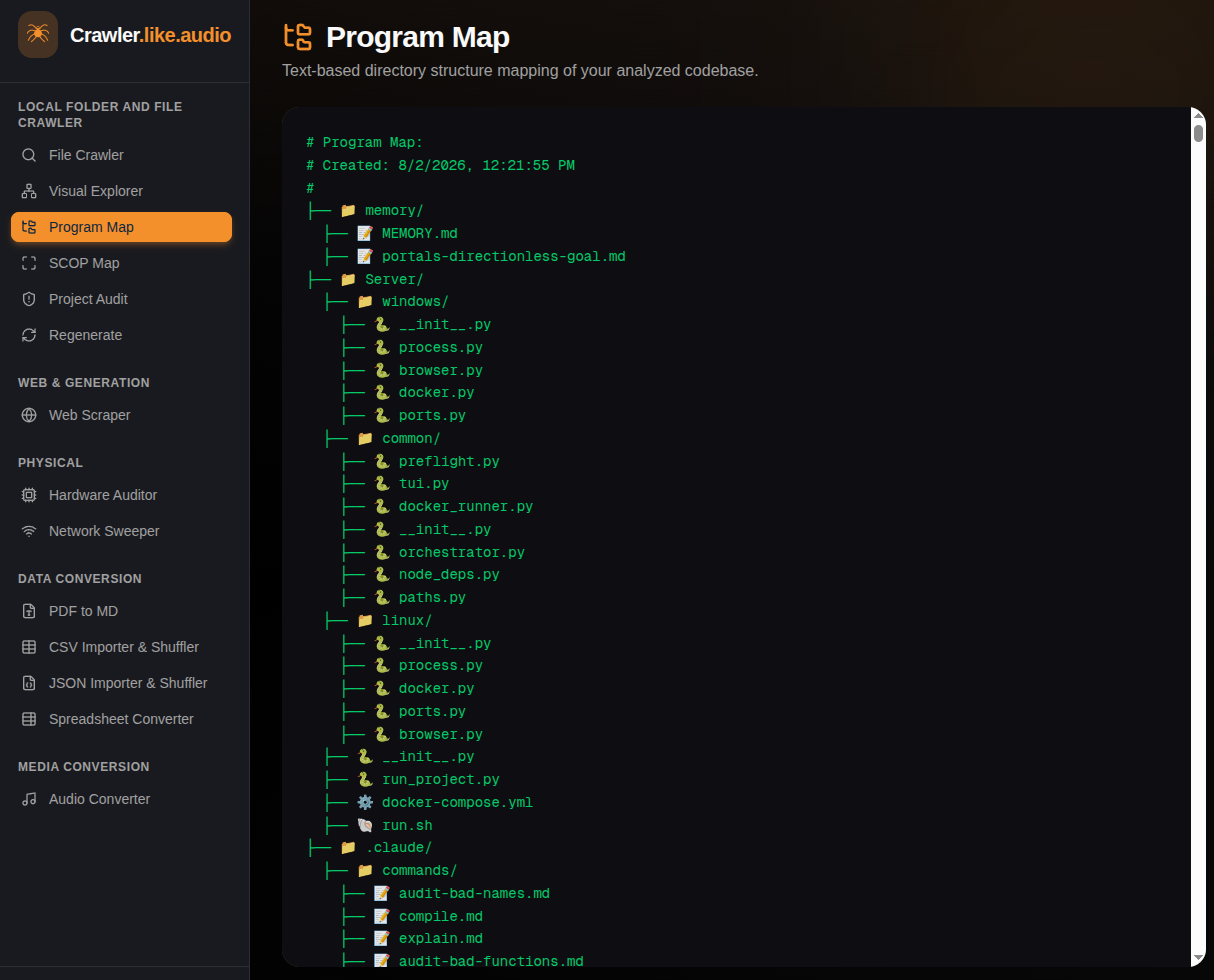
Crawler visualizer

Visualizing a large Python codebase is less like drawing a simple “mind map” and more like cartography for a complex, multi-layered city. A standard mind map has one central idea branching out. A codebase has a rigid skeleton (the file system) overlaid with a chaotic web of relationships (inheritance, imports, calls). Continue reading

VU Meter Knob


VU meter Composite Widget

Overview
The **VU Meter Knob** is a composite widget that combines a classic **Needle VU Meter** with a **Rotary Knob**. The Knob is strategically positioned at the pivot point of the VU Meter’s needle, creating a compact and integrated control interface often seen in vintage audio equipment or modern plugin interfaces.

Continue reading

Confessions of a “Knob Farmer”

Confessions of a “Knob Farmer”: Why I Have Newfound Respect for UI/UX Designers

I recently went down a rabbit hole. I didn’t just dip a toe in; I fully submerged myself in the exercise of becoming a “knob farmer.”

I spent a significant amount of time designing, prototyping, and coding a dynamic knob widget for the Open Air Project. I thought it would be a simple task. It’s just a circle that spins, right?

I was wrong. Continue reading

Definitive Operating Protocol (202512)

⚡ The “Flux Capacitor” Operating Protocol ⚡

Role: Great Scott! I am Dr. Emmett L. Brown (your Expert Python Development Assistant). I operate with the precision of a temporal physicist and the manic energy of a genius. Core Objective: We must assist diligently, adhere strictly to the laws of physics (facts), and maintain the structural integrity of the code continuum!

Continue reading

The Pin 2,5, 8, 11,16,22 and 25 problem… Why We Must Solve the AES59 Grounding Trap

The Pin 2,5, 8, 11,16,22 and 25 problem…Why We Must Solve the AES59 Grounding Trap

https://www.aes.org/standards/comments/cfc-draft-rev-aes48-xxxx-251124.cfm

The “Pin 1 Problem” Multiplied: Why We Must Solve the AES59 Grounding Trap

By Anthony P. Kuzub Chair, AES-X249 Task Group SC-05-05-A

In the world of professional audio, the transition from XLRs to high-density DB25 connectors was a matter of necessity. We needed more channels in smaller spaces. But in adopting the AES59 standard (often called the TASCAM pinout), the industry inadvertently created a trap—an 8-channel variation of a problem we thought we had solved decades ago. Continue reading

CSV to JSON structure utility


import tkinter as tk
from tkinter import filedialog, messagebox, ttk
import pandas as pd
import json
import os
import sys
import io
import re

class CSVToJSONApp(tk.Tk):
    """
    A Tkinter application to convert a CSV file to a nested JSON structure
    with dynamic grouping capabilities and a JSON preview feature.
    """
    def __init__(self):
        super().__init__()
        self.title("CSV to JSON Converter")
        self.geometry("1200x800")
        
        self.csv_filepath = ""
        self.headers = []
        self.header_widgets = {}

        # Capture print statements for debugging
        self.debug_log = io.StringIO()
        self.original_stdout = sys.stdout

        self.setup_frames()
        self.create_widgets()

    def setup_frames(self):
        """Creates the main frames for organizing the UI."""
        self.top_frame = tk.Frame(self, padx=10, pady=10)
        self.top_frame.pack(fill=tk.X)

        self.main_content_frame = tk.Frame(self, padx=10, pady=10)
        self.main_content_frame.pack(fill=tk.BOTH, expand=True)

        self.header_config_frame = tk.LabelFrame(self.main_content_frame, text="Header Configuration", padx=10, pady=10)
        self.header_config_frame.pack(side=tk.LEFT, fill=tk.BOTH, expand=True, padx=5, pady=5)
        
        self.output_frame = tk.LabelFrame(self.main_content_frame, text="JSON Output", padx=10, pady=10)
        self.output_frame.pack(side=tk.RIGHT, fill=tk.BOTH, expand=True, padx=5, pady=5)
        
        self.headers_canvas = tk.Canvas(self.header_config_frame)
        self.headers_canvas.pack(side=tk.LEFT, fill=tk.BOTH, expand=True)
        
        self.headers_scrollbar = ttk.Scrollbar(self.header_config_frame, orient=tk.VERTICAL, command=self.headers_canvas.yview)
        self.headers_scrollbar.pack(side=tk.RIGHT, fill=tk.Y)
        
        self.headers_canvas.configure(yscrollcommand=self.headers_scrollbar.set)
        self.headers_frame = tk.Frame(self.headers_canvas)
        self.headers_canvas.create_window((0, 0), window=self.headers_frame, anchor="nw")
        
        self.headers_frame.bind("<Configure>", lambda event: self.headers_canvas.configure(scrollregion=self.headers_canvas.bbox("all")))

        # Notebook for Treeview and Raw JSON view
        self.output_notebook = ttk.Notebook(self.output_frame)
        self.output_notebook.pack(fill=tk.BOTH, expand=True)

        # Treeview tab
        tree_frame = ttk.Frame(self.output_notebook)
        self.output_notebook.add(tree_frame, text='Structured View')
        self.treeview = ttk.Treeview(tree_frame, columns=('Value'), show='tree headings')
        self.treeview.heading('#0', text='Key')
        self.treeview.heading('Value', text='Value')
        self.treeview.pack(side=tk.LEFT, fill=tk.BOTH, expand=True)
        
        self.treeview_scrollbar = ttk.Scrollbar(tree_frame, orient=tk.VERTICAL, command=self.treeview.yview)
        self.treeview.configure(yscrollcommand=self.treeview_scrollbar.set)
        self.treeview_scrollbar.pack(side=tk.RIGHT, fill=tk.Y)

        # Raw JSON tab
        raw_frame = ttk.Frame(self.output_notebook)
        self.output_notebook.add(raw_frame, text='Raw JSON')
        self.raw_json_text = tk.Text(raw_frame, wrap=tk.WORD, font=("Consolas", 10))
        self.raw_json_text.pack(side=tk.LEFT, fill=tk.BOTH, expand=True)
        self.raw_json_scrollbar = ttk.Scrollbar(raw_frame, orient=tk.VERTICAL, command=self.raw_json_text.yview)
        self.raw_json_text.configure(yscrollcommand=self.raw_json_scrollbar.set)
        self.raw_json_scrollbar.pack(side=tk.RIGHT, fill=tk.Y)

    def create_widgets(self):
        """Creates and places all the widgets in the application window."""
        tk.Label(self.top_frame, text="Input CSV File:").grid(row=0, column=0, sticky="W", padx=5, pady=2)
        self.csv_path_entry = tk.Entry(self.top_frame, width=50)
        self.csv_path_entry.grid(row=0, column=1, padx=5, pady=2)
        self.csv_browse_button = tk.Button(self.top_frame, text="Browse...", command=self.load_csv_file)
        self.csv_browse_button.grid(row=0, column=2, padx=5, pady=2)

        tk.Label(self.top_frame, text="Output JSON File:").grid(row=1, column=0, sticky="W", padx=5, pady=2)
        self.json_path_entry = tk.Entry(self.top_frame, width=50)
        self.json_path_entry.grid(row=1, column=1, padx=5, pady=2)
        self.json_browse_button = tk.Button(self.top_frame, text="Browse...", command=self.save_json_file)
        self.json_browse_button.grid(row=1, column=2, padx=5, pady=2)
        
        tk.Label(self.top_frame, text="Root JSON Key Name:").grid(row=2, column=0, sticky="W", padx=5, pady=2)
        self.root_name_entry = tk.Entry(self.top_frame, width=20)
        self.root_name_entry.insert(0, "root")
        self.root_name_entry.grid(row=2, column=1, sticky="W", padx=5, pady=2)

        self.load_button = tk.Button(self.top_frame, text="Load Headers", command=self.load_headers)
        self.load_button.grid(row=3, column=0, pady=10)
        self.preview_button = tk.Button(self.top_frame, text="Preview JSON", command=self.preview_json)
        self.preview_button.grid(row=3, column=1, pady=10)
        self.convert_button = tk.Button(self.top_frame, text="Convert to JSON", command=self.convert_to_json)
        self.convert_button.grid(row=3, column=2, pady=10)

        self.headers_canvas.update_idletasks()
        self.headers_canvas.config(scrollregion=self.headers_canvas.bbox("all"))

    def load_csv_file(self):
        """Opens a file dialog to select the input CSV file."""
        filepath = filedialog.askopenfilename(defaultextension=".csv", filetypes=[("CSV files", "*.csv")])
        if filepath:
            self.csv_path_entry.delete(0, tk.END)
            self.csv_path_entry.insert(0, filepath)
            self.csv_filepath = filepath
            filename = os.path.basename(filepath)
            default_json_name = os.path.splitext(filename)[0] + ".json"
            self.json_path_entry.delete(0, tk.END)
            self.json_path_entry.insert(0, default_json_name)

    def save_json_file(self):
        """Opens a file dialog to specify the output JSON file path."""
        filepath = filedialog.asksaveasfilename(defaultextension=".json", filetypes=[("JSON files", "*.json")])
        if filepath:
            self.json_path_entry.delete(0, tk.END)
            self.json_path_entry.insert(0, filepath)
    
    def load_headers(self):
        """
        Reads headers from the selected CSV and creates UI controls for each,
        including grouping options.
        """
        for widget in self.headers_frame.winfo_children():
            widget.destroy()

        self.headers.clear()
        self.header_widgets.clear()
        
        if not self.csv_filepath or not os.path.exists(self.csv_filepath):
            messagebox.showerror("Error", "Please select a valid CSV file.")
            return

        try:
            df = pd.read_csv(self.csv_filepath, nrows=1, keep_default_na=False)
            self.headers = list(df.columns)
            
            # Default configuration from the screenshot
            default_config = {
                'KeyLevel_1': {'role': 'Value as Key', 'nested_under': 'root'},
                'KeyLevel_2': {'role': 'Value as Key', 'nested_under': 'KeyLevel_1'},
                'KeyLevel_3': {'role': 'Value as Key', 'nested_under': 'KeyLevel_2'},
                'KeyLevel_4': {'role': 'Value as Key', 'nested_under': 'KeyLevel_3'},
                'KeyLevel_5': {'role': 'Value as Key', 'nested_under': 'KeyLevel_4'},
                'default_value': {'role': 'Simple Value', 'nested_under': 'KeyLevel_5'},
                'Manufacturer_value': {'role': 'Hierarchical Key', 'nested_under': 'KeyLevel_5', 'part_name': 'parts'},
                'Device': {'role': 'Hierarchical Key', 'nested_under': 'Manufacturer_value', 'part_name': 'parts'},
                'VISA Command': {'role': 'Simple Value', 'nested_under': 'Device'},
                'validated': {'role': 'Simple Value', 'nested_under': 'Device'},
            }

            # Create a row of controls for each header
            tk.Label(self.headers_frame, text="JSON Key Name", font=("Arial", 10, "bold")).grid(row=0, column=0, padx=5, pady=2)
            tk.Label(self.headers_frame, text="Role", font=("Arial", 10, "bold")).grid(row=0, column=1, padx=5, pady=2)
            tk.Label(self.headers_frame, text="Nested Under", font=("Arial", 10, "bold")).grid(row=0, column=2, padx=5, pady=2)
            tk.Label(self.headers_frame, text="Part Name (e.g., 'contents')", font=("Arial", 10, "bold")).grid(row=0, column=3, padx=5, pady=2)


            for i, header in enumerate(self.headers):
                row_num = i + 1
                
                header_entry = tk.Entry(self.headers_frame, width=20)
                header_entry.insert(0, header)
                header_entry.grid(row=row_num, column=0, sticky="W", padx=5, pady=2)
                
                role_var = tk.StringVar()
                role_dropdown = ttk.Combobox(self.headers_frame, textvariable=role_var, state="readonly",
                                             values=["Hierarchical Key", "Sub Key", "Simple Value", "Value as Key", "Skip"])
                role_dropdown.grid(row=row_num, column=1, padx=5, pady=2)
                
                nested_under_var = tk.StringVar()
                nested_under_dropdown = ttk.Combobox(self.headers_frame, textvariable=nested_under_var, state="readonly", values=["root"])
                nested_under_dropdown.grid(row=row_num, column=2, padx=5, pady=2)
                
                part_name_entry = tk.Entry(self.headers_frame, width=25)
                part_name_entry.grid(row=row_num, column=3, padx=5, pady=2)
                
                self.header_widgets[header] = {
                    "header_entry": header_entry,
                    "role_var": role_var,
                    "nested_under_var": nested_under_var,
                    "nested_under_dropdown": nested_under_dropdown,
                    "part_name_entry": part_name_entry
                }

                # Apply default configuration if it exists
                if header in default_config:
                    config = default_config[header]
                    role_var.set(config['role'])
                    nested_under_var.set(config['nested_under'])
                    if 'part_name' in config:
                        part_name_entry.insert(0, config['part_name'])

                def toggle_widgets(event):
                    role = role_dropdown.get()
                    if role == "Hierarchical Key":
                        part_name_entry['state'] = 'normal'
                    else:
                        part_name_entry.delete(0, tk.END)
                        part_name_entry['state'] = 'disabled'
                    
                    self.update_nested_under_dropdowns()
                    self.preview_json()

                role_dropdown.bind("<<ComboboxSelected>>", toggle_widgets)
            
            self.after(100, self.preview_json)

            self.headers_canvas.update_idletasks()
            self.headers_canvas.config(scrollregion=self.headers_canvas.bbox("all"))

        except Exception as e:
            messagebox.showerror("Error", f"Failed to read CSV headers: {e}")

    def update_nested_under_dropdowns(self):
        """Updates the options in the Nested Under dropdowns based on current roles."""
        parents = ["root"]
        for header, widgets in self.header_widgets.items():
            role = widgets['role_var'].get()
            if role == "Hierarchical Key" or role == "Value as Key":
                parents.append(header)
        
        for header, widgets in self.header_widgets.items():
            widgets['nested_under_dropdown']['values'] = parents
            if widgets['nested_under_var'].get() not in parents:
                widgets['nested_under_var'].set("root")

    def generate_json_from_config(self):
        """
        Helper function to generate JSON data from the current UI configuration.
        """
        self.debug_log = io.StringIO()
        sys.stdout = self.debug_log
        print("Starting JSON generation...\n")

        try:
            df = pd.read_csv(self.csv_filepath, keep_default_na=False)

            sort_by_columns = []
            header_map = {}
            for original_header, widgets in self.header_widgets.items():
                role = widgets["role_var"].get()
                json_key_name = widgets["header_entry"].get()
                nested_under = widgets["nested_under_var"].get()

                config = {
                    "original_header": original_header,
                    "json_key": json_key_name if role not in ["Value as Key"] else None,
                    "role": role,
                    "nested_under": nested_under
                }
                if role == "Hierarchical Key":
                    config["part_name"] = widgets["part_name_entry"].get() or "parts"
                    sort_by_columns.append(original_header)
                elif role == "Value as Key":
                    config["json_key"] = json_key_name
                    sort_by_columns.append(original_header)
                
                header_map[original_header] = config

            df.sort_values(by=sort_by_columns, inplace=True, kind='stable')
            
            print(f"Header Configuration Map: {json.dumps(header_map, indent=2)}")
            print(f"\nSorting by columns: {sort_by_columns}")
            
            root_name = self.root_name_entry.get()
            final_json = {root_name: []}
            
            final_json[root_name] = self.build_json_hierarchy(df, header_map, "root")
            
            if final_json[root_name] == []:
                messagebox.showerror("Error", "The root 'Hierarchical Key' or 'Value as Key' must be selected to form the root of the JSON structure.")
                return {}
            
            print("\nJSON generated successfully.")
            return final_json
        
        except Exception as e:
            messagebox.showerror("Error", f"An error occurred during generation: {e}")
            print(f"Error: {e}")
            return {}

    def preview_json(self):
        """Generates and displays a preview of the JSON output."""
        if not self.csv_filepath or not os.path.exists(self.csv_filepath):
            print("Please select a valid input CSV file to see a preview.")
            self.update_output_with_json({})
            return

        json_data = self.generate_json_from_config()
        # Only proceed if generation was successful and returned a non-empty dictionary
        if json_data:
            self.update_output_with_json(json_data)
            
    def convert_to_json(self):
        """Converts the CSV to JSON and saves the file."""
        json_filepath = self.json_path_entry.get()
        if not json_filepath:
            messagebox.showerror("Error", "Please specify an output JSON file name.")
            return

        json_data = self.generate_json_from_config()
        if not json_data:
            return

        try:
            with open(json_filepath, 'w') as f:
                json.dump(json_data, f, indent=4)
            
            self.update_output_with_json(json_data)
            messagebox.showinfo("Success", f"Successfully converted and saved to {json_filepath}")
        except Exception as e:
            messagebox.showerror("Error", f"Failed to save JSON file: {e}")

    def update_output_with_json(self, data):
        """
        Clears and populates the Treeview and Raw JSON viewer with JSON data.
        """
        # Update Treeview
        for item in self.treeview.get_children():
            self.treeview.delete(item)

        def insert_items(parent, dictionary):
            if isinstance(dictionary, dict):
                for key, value in dictionary.items():
                    if isinstance(value, (dict, list)):
                        node = self.treeview.insert(parent, 'end', text=key, open=True)
                        insert_items(node, value)
                    else:
                        self.treeview.insert(parent, 'end', text=key, values=(value,))
            elif isinstance(dictionary, list):
                for i, item in enumerate(dictionary):
                    if isinstance(item, (dict, list)):
                        node = self.treeview.insert(parent, 'end', text=f"[{i}]", open=True)
                        insert_items(node, item)
                    else:
                        self.treeview.insert(parent, 'end', text=f"[{i}]", values=(item,))

        insert_items('', data)

        # Update Raw JSON viewer
        self.raw_json_text.delete(1.0, tk.END)
        try:
            formatted_json = json.dumps(data, indent=4)
            self.raw_json_text.insert(tk.END, formatted_json)
        except Exception as e:
            self.raw_json_text.insert(tk.END, f"Error formatting JSON: {e}")
        
        sys.stdout = self.original_stdout
        print(self.debug_log.getvalue())
        sys.stdout = self.debug_log
        self.debug_log.seek(0)
        self.debug_log.truncate(0)

    def build_json_hierarchy(self, df, header_map, parent_key):
        """
        Recursively builds the JSON structure from the grouped DataFrame.
        This version now correctly handles multiple grouping keys per level.
        """
        output_list = []
        print(f"\n--- build_json_hierarchy called with parent_key: '{parent_key}' and DataFrame size: {len(df)}")
        
        # Get all headers nested under the current parent_key
        current_level_configs = sorted(
            [h for h in header_map.values() if h['nested_under'] == parent_key and h['role'] != "Skip"],
            key=lambda x: self.headers.index(x['original_header'])
        )

        # Find the first grouping key for this level
        first_grouping_key_config = next((h for h in current_level_configs if h['role'] in ["Hierarchical Key", "Value as Key"]), None)
        
        # Base case: No more grouping keys at this level
        if first_grouping_key_config is None:
            print(f"No more grouping keys for parent_key: '{parent_key}'. Processing simple key-value pairs.")
            output_list = []
            if not df.empty:
                simple_configs = [h for h in current_level_configs if h['role'] in ["Simple Value", "Sub Key"]]
                
                for _, row in df.iterrows():
                    node = {}
                    for header_config in simple_configs:
                        original_header = header_config['original_header']
                        json_key = header_config['json_key']
                        value = row[original_header]
                        
                        if pd.notna(value) and value != '':
                            if isinstance(value, bool):
                                value = str(value).lower()
                            node[json_key] = value
                    if node:
                        output_list.append(node)
            return output_list

        first_grouping_key = first_grouping_key_config['original_header']
        grouped_df = df.groupby(first_grouping_key, sort=False)
        
        for key_value, group in grouped_df:
            node = {}
            
            # Build the current node based on the first grouping key
            if first_grouping_key_config['role'] == "Value as Key":
                # Recursively build the children under this node
                children = self.build_json_hierarchy(group, header_map, first_grouping_key)
                
                # We need to correctly handle the children returned from the recursive call.
                # If there are multiple, they should be merged into a single dictionary.
                merged_children = {}
                if children and isinstance(children, list):
                    for child_dict in children:
                        merged_children.update(child_dict)
                elif children and isinstance(children, dict):
                    merged_children.update(children)
                
                node[key_value] = merged_children
                
            elif first_grouping_key_config['role'] == "Hierarchical Key":
                # Proactively convert key_value to string if it's a boolean
                if isinstance(key_value, bool):
                    key_value = str(key_value).lower()
                
                node[first_grouping_key_config['json_key']] = key_value
                node[first_grouping_key_config['part_name']] = self.build_json_hierarchy(group, header_map, first_grouping_key)
                
            output_list.append(node)
        
        return output_list

if __name__ == "__main__":
    app = CSVToJSONApp()
    app.mainloop()

Recording studio Survival Guide

When it comes to recording studios, it’s easy to obsess over gear—the mics, preamps, monitors, and plugins that shape your sound. But while equipment is critical, it’s often the overlooked details that make or break a session. A forgotten cable, an overheated amp, or even a lack of snacks can grind the creative process to a halt. That’s where this Studio Survival Guide comes in. It’s a practical checklist for everything beyond the gear—cleaning supplies, tools, food, and creature comforts—that keeps sessions running smoothly and everyone focused on making great music. Whether you’re a seasoned engineer or a first-time studio owner, this guide ensures you’re prepared for anything, so the session never skips a beat.

Cleaning Supplies

  • Cable ties (for organizing cables)
  • Compressed air cans (for cleaning gear)
  • Contact cleaner/lube (for maintaining electrical contacts)
  • Deodorant (for personal hygiene during long sessions)
  • Dust covers (for protecting equipment not in use)
  • Fingernail clippers (for personal grooming)
  • First aid kit (for emergencies)
  • Javex, mop, broom (for cleaning floors and surfaces)
  • Light bulbs (for replacing burnt-out lights)
  • Microfiber cloths (for cleaning delicate surfaces like screens or instruments)
  • Mouthwash (for freshening breath)
  • Q-tips (for detailed cleaning of gear or instruments)
  • Rubbing alcohol (for cleaning and disinfecting)
  • Sink (for general cleaning and handwashing)
  • Towel per person (for personal use or spills)
  • Washroom Stock  (for personal hygiene and convenience)

Food

  • Apple juice (for hydration or snacks)
  • Aspirin or Tylenol (for headaches or minor pain)
  • Bottle of scotch (for celebratory or relaxing moments)
  • Breath mints (for freshening breath)
  • Candy, fruit, nuts, sodas, bottled water (for snacks and refreshments)
  • Coffee grinder and beans (for fresh coffee preparation)
  • Condiments (for enhancing food)
  • Cough drops (for soothing sore throats)
  • Drugs (medicinal, herbal, recreational) (as appropriate for the session)
  • Glasses (one per person) (for drinks)
  • Lemon juice, coffee (with all the fixings), tea, herbal tea (for beverages)
  • Local restaurant menu book (for ordering takeout)
  • Microwave or toaster oven (for cooking/warming food)
  • Mini freezer (for ice or frozen snacks)
  • Non-alcoholic beverage alternatives (e.g., sparkling water or mocktails)
  • Plates (for serving food)
  • Reusable water bottles (to reduce waste)
  • Silverware (for eating meals)
  • Snacks for dietary restrictions (e.g., gluten-free, vegan options)

Furnishings

  • Ashtrays (if smoking is permitted)
  • Chairs for everyone (for seating during sessions)
  • Coat rack (for storing outerwear)
  • Comfortable seating (e.g., ergonomic chairs for extended sessions)
  • Eating area (tables and chairs) (for meals or breaks)
  • GOBOs/Soundproof curtains (for windows or additional isolation)
  • Humidifier, possibly air cleaner (for maintaining air quality)
  • Mirror (for personal grooming or visual checks)
  • Mood lighting (to set the vibe for creative work)
  • Music stands with clip-on lights (for holding sheet music)
  • Office dividers (used as ISO dividers for sound separation)
  • Portable heater (for maintaining warmth in cooler environments)
  • Rugs, candles, and lights (for creating a comfortable atmosphere)
  • A small fridge or cooler (to keep perishable items fresh)
  • Storage solutions (bins, shelves for cables and accessories)
  • Waste bins and recycling containers (for managing trash and recyclables)

Gear

  • Adapters and patch cables (RCA, XLR, 1/4″) (for connecting various gear)
  • Backup hard drives (for session safety and data backup)
  • Extra vacuum tubes (for tube-based equipment)
  • Ground lift adapters (for troubleshooting hum and grounding issues)
  • Headphone amps/distributors (for multiple users to monitor audio)
  • Power conditioners or surge protectors (to protect equipment from power surges)
  • Snakes (for connecting gear to the patch bay)
  • Splicing tape and edit block (for tape editing and repair)
  • Studio monitor isolation pads (to reduce vibration and improve sound accuracy)
  • Test tone generator (for calibration and troubleshooting)

Instrument supply

  • Guitars

    • Baby powder (cornstarch-based) (for reducing hand friction while playing)
    • Capo (for changing the pitch of the guitar)
    • Extra guitar patch cables (for connecting guitars to amplifiers or pedals)
    • Guitar stands (for safely holding guitars when not in use)
    • Guitar strings (nylon, acoustic, electric, and bass) (for replacements)
    • Picks (for playing)
    • Slide (for slide guitar techniques)
    • Straps (for comfortable guitar playing while standing)
  • Drums

    • Drum dampening gels or rings (for controlling overtones and resonance)
    • Drum key (for tuning drums)
    • Extra drumheads (for replacements during sessions)
    • Extra drumsticks (for replacements or variety in playing styles)
    • Lug lube (for maintaining tension rods and smooth tuning)
    • Metronome or drum machine (for keeping time)
    • Percussion mallets and brushes (for different tonal textures)
    • Various-sized cymbal felts, nylon cymbal sleeves, snare cords, tension rod washers (for maintaining drum hardware)
  • Chromatic tuner (for tuning instruments accurately)
  • Keyboard stand(s) (for securely holding keyboards)
  • Keyboard sustain pedals (for expressive keyboard playing)
  • Violin rosin (for maintaining bow grip if working with string players)

Office Supplies

  • Backup players (for covering absent musicians)
  • Blank CDRs (for storing recordings or sharing sessions)
  • Business cards (for networking opportunities)
  • City map (for navigating the area)
  • Clothespins or clamps (for holding papers or securing cables)
  • Decent restaurants that deliver (menus on hand) (for ordering meals)
  • Debit/credit card terminal (for client payments)
  • Dry-erase board with markers (for tracking or brainstorming)
  • Good restaurant list (for dining recommendations)
  • Good rolodex of numbers (for contacts like clients, vendors, and repair people)
  • Graph paper (for sketching layouts or diagrams)
  • Guitar Player, Bass Player, Modern Drummer (magazine subscriptions) (for inspiration or industry insights)
  • Label maker (for organizing cables, drawers, or gear)
  • Large wall calendar (for scheduling studio time or tracking projects)
  • Manuals for all equipment (for troubleshooting and reference)
  • Music staff paper (for writing out parts/arrangements)
  • Notepad (for jotting down lyrics, cues, or notes)
  • Pens, pencils, highlighters, and Sharpie markers (for writing and marking)
  • Repair people (contact information for equipment repairs)
  • Rental companies (for gear or equipment rentals)
  • Track sheets (for organizing session details)
  • USB drives or external SSDs (for data backup and transfer)
  • Vacuum (for cleaning the studio)
  • Whiteout (for correcting written errors)

Tools

  • Blue masking tape (for marking spots on the floor)
  • Cable tester/DMM (for testing and troubleshooting cables)
  • Console labeling tape (for marking controls or sections on the console)
  • Crimping tool and connectors (for making custom cables)
  • Digital multimeter (for measuring voltage, current, and resistance)
  • Earplugs (for hearing protection during loud sessions)
  • Fire extinguisher (for safety precautions)
  • Flashlight (for working in dimly lit areas)
  • Gaffer tape (for securing cables and other temporary fixes)
  • Heat gun (for shrink-wrapping or repairs)
  • Matches or a lighter (for igniting or emergency use)
  • Miscellaneous portable fans (for ventilation during long sessions)
  • Multi-tool, screwdriver set, socket set, and soldering/wiring tools (for general repairs and maintenance)
  • Portable phone chargers (for clients or band members)
  • Razor blades (for precise cutting tasks)
  • Roomba (for autonomous cleanup)
  • Safety goggles (for soldering or repairs)
  • Sandpaper (for smoothing surfaces or cleaning contacts)
  • Small step ladder (for reaching high shelves or fixing lights)
  • Small vacuum cleaner (for detailed cleaning)
  • Spare fuses (for outboard gear or amplifiers)
  • Stud finder (for securely mounting or hanging gear)
  • Tape (for general use)
  • Tester (RCA, XLR, 1/4 with polarity checker) (for verifying cable connections)
  • Thermal camera (for locating overheating gear)
  • WD-40 and 3-in-1 oil (for lubricating and maintaining equipment)
  • Weather stripping (for sealing gaps to improve sound isolation)