20 essential SQL commands and clauses

Data Manipulation: Reading and Modifying Data

1. SELECT

  • What it does: Retrieves data from one or more tables.

  • Why it’s important: It is the most fundamental and frequently used SQL command. Without it, you cannot view the information stored in your database.

  • Real-life example: An e-commerce site uses SELECT to display a list of all products currently in stock to a customer browsing the catalog.

2. INSERT INTO

  • What it does: Adds new rows of data to a table.

  • Why it’s important: It is the primary way new information enters your system.

  • Real-life example: When a new user creates an account on a social media app, an INSERT command saves their username, email, and password hash into the “Users” table.

3. UPDATE

  • What it does: Modifies existing data within a table.

  • Why it’s important: Data changes over time. This command ensures your database reflects the most current reality without having to delete and recreate records.

  • Real-life example: A banking application uses UPDATE to change a customer’s account balance after they make a withdrawal.

4. DELETE

  • What it does: Removes one or more rows from a table.

  • Why it’s important: Essential for removing obsolete, incorrect, or canceled records to save space and maintain data accuracy.

  • Real-life example: A healthcare system uses DELETE to remove an appointment record when a patient calls to cancel it.


Data Definition: Structuring the Database

5. CREATE

  • What it does: Builds a new database, table, index, or view.

  • Why it’s important: It sets up the actual architecture and containers where your data will live.

  • Real-life example: A developer launching a new blog uses CREATE TABLE to set up a structure with columns for “Post Title”, “Author”, “Publish Date”, and “Content”.

6. ALTER

  • What it does: Modifies the structure of an existing database object (like adding or dropping a column from a table).

  • Why it’s important: Business requirements evolve. ALTER lets you adapt your database schema without losing the existing data.

  • Real-life example: An HR platform adds a “Pronouns” column to an existing “Employee” table using the ALTER command.

7. DROP

  • What it does: Permanently deletes an entire database, table, or index, along with all its data.

  • Why it’s important: Used to clean up old, unused structures that are taking up server resources.

  • Real-life example: A company migrating to a completely new software system might use DROP TABLE on the legacy tables once the migration is fully verified.

8. TRUNCATE

  • What it does: Quickly removes all rows from a table, but leaves the table structure intact.

  • Why it’s important: It is much faster and uses fewer system resources than using DELETE to clear out a massive table.

  • Real-life example: A weather monitoring system uses TRUNCATE at midnight on the first of the month to clear out temporary daily logs after they’ve been archived elsewhere.


Filtering and Sorting: Refining Your Queries

9. WHERE

  • What it does: Filters records based on specific conditions.

  • Why it’s important: Databases contain millions of rows. WHERE allows you to isolate the exact specific data you need.

  • Real-life example: A customer service rep uses a WHERE clause to find an order using a specific tracking number (WHERE tracking_number = '12345').

10. ORDER BY

  • What it does: Sorts the result set of a query in ascending (ASC) or descending (DESC) order.

  • Why it’s important: Organizes raw data into a readable, logical format for the end user.

  • Real-life example: A real estate website uses ORDER BY price DESC to show the most expensive houses at the top of the search results.

11. GROUP BY

  • What it does: Groups rows that have the same values into summary rows (often used with aggregate functions like COUNT, MAX, SUM).

  • Why it’s important: Crucial for data analysis and generating reports.

  • Real-life example: A retail manager uses GROUP BY store_location alongside a SUM(sales) function to see total daily revenue for each branch.

12. HAVING

  • What it does: Filters records after they have been grouped by the GROUP BY clause (since WHERE cannot be used with aggregate functions).

  • Why it’s important: Allows you to set conditions on summarized data.

  • Real-life example: Using the retail example above, adding HAVING SUM(sales) > 10000 filters the report to only show store branches that made over $10,000 that day.

13. DISTINCT

  • What it does: Returns only distinct (different) values, removing duplicates from the result set.

  • Why it’s important: Useful for finding the unique categories or types of data within a massive column.

  • Real-life example: A marketing team uses SELECT DISTINCT country on their subscriber list to see exactly which countries their readers are from, without seeing the same country listed 5,000 times.

14. LIMIT (or TOP / FETCH FIRST)

  • What it does: Restricts the number of rows returned by a query.

  • Why it’s important: Improves performance by not loading unnecessary data, especially when you only need a sample or the “top X” results.

  • Real-life example: A gaming leaderboard query uses ORDER BY score DESC LIMIT 10 to display only the top 10 highest-scoring players.


Combining Data: Joins and Sets

15. INNER JOIN

  • What it does: Combines rows from two or more tables based on a related column between them, returning only records that have matching values in both tables.

  • Why it’s important: Relational databases split data into multiple tables to reduce redundancy. Joins are how you stitch that data back together into a meaningful picture.

  • Real-life example: An app combines a “Students” table and a “Classes” table using an INNER JOIN to generate a report showing only students who are actively enrolled in a class.

16. LEFT JOIN

  • What it does: Returns all records from the left table, and the matched records from the right table. If there is no match, the result is NULL from the right side.

  • Why it’s important: Vital for finding “orphaned” data or seeing a complete list of a primary entity regardless of whether they have secondary actions.

  • Real-life example: An e-commerce site uses a LEFT JOIN to show a list of all registered users, alongside their recent purchases. Users who haven’t bought anything yet still show up, but with a blank purchase history.

17. UNION

  • What it does: Combines the result sets of two or more SELECT statements into a single column output.

  • Why it’s important: Useful for consolidating similar data that lives in completely different tables.

  • Real-life example: A global company has a “North_America_Staff” table and a “Europe_Staff” table. They use UNION to pull a single, combined list of all employee email addresses.


Security and Transactions: Control and Safety

18. GRANT

  • What it does: Gives specific user accounts permission to perform certain actions (like SELECT or UPDATE) on specific database objects.

  • Why it’s important: The backbone of database security, ensuring users can only access or change what they are authorized to.

  • Real-life example: A database administrator uses GRANT SELECT ON payroll_table TO 'finance_team' so the finance department can read salary data, but cannot alter it.

19. COMMIT

  • What it does: Permanently saves all changes made during the current database transaction.

  • Why it’s important: Ensures that a series of interconnected database actions all succeed together before making them permanent, preventing partial data updates.

  • Real-life example: When you transfer money online, the database removes money from your account and adds it to another. COMMIT is called at the very end to finalize both actions simultaneously.

20. ROLLBACK

  • What it does: Undoes transactions that have not yet been saved to the database.

  • Why it’s important: Acts as a fail-safe. If an error occurs halfway through a complex multi-step update, ROLLBACK reverts the database to its previous stable state.

  • Real-life example: In the money transfer example above, if the system successfully deducts your money but the receiving bank’s server crashes before the money is deposited, ROLLBACK is triggered to refund your account as if the transaction never started.

Handy Linux command

“REISUB” (The Safe Reboot)

If your entire computer is frozen and the kills above don’t help, Linux users often use the REISUB sequence to reboot safely without corrupting the hard drive. You hold Alt + SysRq and slowly type:

R (unRaw keyboard)
E (tErminate processes)
I (kIll processes)
S (Sync data to disk)
U (Unmount disks)
B (reBoot)

Memory  Tool
sudo apt install htop

Hard Disk Tool:
sudo apt install baobab

MQTT SERVER:

sudo systemctl stop mosquitto
sudo rm /var/lib/mosquitto/mosquitto.db
sudo systemctl start mosquitto
systemctl status mosquitto //IS it running
tail -f /path/to/logfile // Outputs the last 10 lines of a file and actively monitors it for new entries.

PID

PS AUX //Show all process

KILL
Kill PID number
killall python3
killall chrome

Gemini –yolo //accepts all edits without prompting

Networking:
ss -tulpn // Shows all listening ports and the processes attached to them.

🛠️ The “Oops” Savers
history | grep <keyword>: Searches your terminal history for that complex, 50-character command you typed three days ago but forgot to save.

sudo !!: If you type a command and get a “Permission denied” error, running this will instantly rerun your last command with sudo appended to the front.


————————–
Python CACHE DELETE:
# Deletes all __pycache__ directories
find . -type d -name “__pycache__” -exec rm -rf {} +

# Deletes any stray compiled Python files (especially helpful for older Python versions)
find . -type f -name “*.py[co]” -delete

# pip cahse purge
pip cache purge

VU meter iterations

Ever wonder why VU meters are always rectangular or circular?

It’s usually a matter of mechanical necessity. In the analog world, the physical sweep of a needle and the housing required to protect it dictated the design. We’ve become so accustomed to these “skeuomorphic” constraints that anything else feels almost alien—mechanically impossible, and therefore, aesthetically foreign.

But when you move from physical hardware to dynamic variables, hooks, and handles, those walls disappear.

The Danger & Joy of “Outside the Box”

Iterating without boundaries is a double-edged sword:
-The Danger: You can lose the user. If a shape is too “unseen,” it loses its familiarity and function.
-The Joy: You unlock unlimited potential. By manipulating the geometry through code, I’ve been riffing on the classic VU meter to see where the math takes me.

I’ve had to invent a new vocabulary just to keep track of these iterations. Say hello to the Squircle, the Squectangle, and the Hex-Dome.

Breaking the Skewmorphic Ceiling:
By leaning into the “mechanically impossible,” we create something that couldn’t exist in a world of gears and glass. It challenges the eye and redefines what an interface can look like.

Personally, the Parking Meter style is my favorite—there’s something inherently authoritative and nostalgic about that heavy arc.

Which of these shapes do you think works best? Or have we pushed “outside the box” too far?

#DesignSystems #UIUX #IterativeDesign #CreativeCoding #VUMeters #ProductDesign

Zero-Copy Sound: How MXL Reinvents Audio Exchange for the Software-Defined Studio

The broadcast industry is undergoing a fundamental shift from hardware-centric systems to software-defined infrastructure, a move championed by initiatives like the EBU Dynamic Media Facility (DMF). At the heart of this transition lies the Media eXchange Layer (MXL), a high-performance data plane designed to solve the interoperability challenges of virtualized production. While MXL handles video through discrete grains, its approach to audio—via Continuous Flows—represents a sophisticated evolution in how compute resources exchange data using shared memory.

The Move from Sending to Sharing
Traditional IP broadcast workflows rely on a “sender/receiver” model involving packetization and network overhead. MXL replaces this with a shared memory model. In this architecture, media functions (such as audio processors or mixers) do not “send” audio; rather, they write data to memory-mapped files located in a tmpfs (RAM disk) backed volume known as an MXL Domain.
This allows for a “zero-overhead” exchange where readers and writers access the same physical memory, eliminating the CPU cycles usually wasted on copying data or managing network stacks. Continue reading

Schematic Semantics: Ethernet left or right side

The debate over whether an Ethernet port functions as a transmitter or a receiver on a schematic is the technical equivalent of the “toilet paper over or under” argument. It is a fundamental disagreement over orientation that often ignores the fact that the utility remains the same regardless of which way the roll is hanging.

Traditionally, schematics follow a rigid left-to-right flow: sources (transmitters) live on the left, and sinks (receivers) live on the right. This worked perfectly for analog audio or serial data where electricity moved in one direction. Ethernet, however, is a bidirectional transceiver technology. It is constantly “pushing” and “pulling” simultaneously, which breaks the traditional rules of drafting.

The Access vs. Consumption Debate

Many designers view the Ethernet switch as the “provider.” In this mental model, the switch is the source of connectivity, sitting on the left side of the page and “feeding” access to the edge devices on the right. The edge device is seen as the consumer of the network.

Conversely, others view the edge device as the “source” of the data itself. If a 4K camera is generating a video stream, that camera is the transmitter, and the switch is merely the consumer of that stream. In this scenario, the camera sits on the left, and the switch sits on the right.

Why It Is Like Toilet Paper

Just like the “over or under” debate, both sides have logical justifications that feel like common sense to the practitioner:

* The “Over” (Switch as Source) Argument

* It prioritizes infrastructure. Without the switch, there is no signal path.

* It follows the logic of power distribution, where the source of “energy” (in this case, data access) starts at the core.

* It treats the network as a utility, similar to a water main providing flow to a faucet.

* The “Under” (Edge as Source) Argument

* It prioritizes the payload. A switch with no devices has nothing to move.

* It maintains the “Signal Flow” tradition. If a microphone generates audio, it must be on the left, regardless of whether it uses an XLR or an RJ45 jack.

* It focuses on the intent of the system (e.g., getting video from a camera to a screen).

The Best Mechanism for Drafting

The shift in modern schematic design is moving away from seeing the switch as a “provider of access.” Instead of trying to force a bidirectional “highway” into a one-way “pipe” layout, the most effective designers are treating the switch as a neutral center point.

By placing the network switch in the center of the drawing, you acknowledge its role as a transceiver. You can then place “Signal Generators” (like cameras or microphones) to the left of the switch and “Signal Consumers” (like displays or speakers) to the right. This acknowledges that while the switch provides the “road,” it is the edge devices that provide the “traffic.”

Ultimately, as long as the drawing is consistent, it doesn’t matter if the “paper” is hanging over or under—as long as the data reaches its destination.


Rotary Selector Switch (SelectorSwitch)

Rotary Selector Switch (SelectorSwitch)

The `SelectorSwitch` is a high-fidelity Tkinter Canvas-based widget designed to model discrete multi-position controls. It mimics the behavior of physical rotary switches found on industrial equipment, laboratory instruments, and high-end audio gear.

Continue reading

CMDP: Circular Motion Displacement Potentiometer

CMDP: Circular Motion Displacement Potentiometer

DEMO: http://like.audio/CMDP

# CMDP: Circular Motion Displacement Potentiometer

Overview
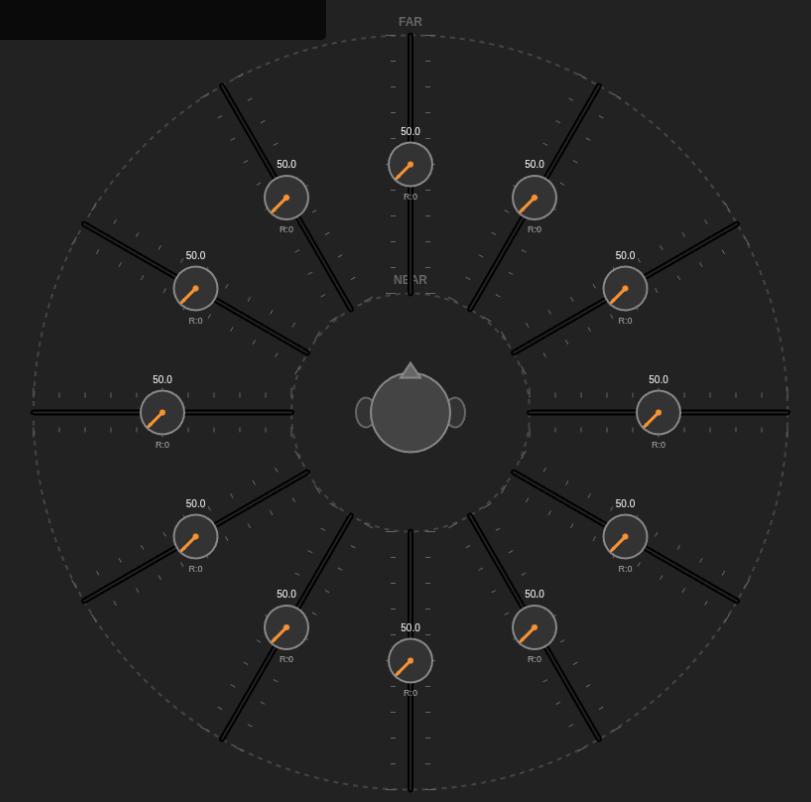
The **Circular Motion Displacement Potentiometer (CMDP)** is a novel user interface concept designed for spatial audio mixing, microphone array management, and multidimensional sound control. It combines the precision of linear faders with the intuitive spatial organization of a polar coordinate system, allowing users to visualize and manipulate sound sources in a 360-degree field.


Continue reading

Rust Headless 96kHz Audio Console

Architecting a Scalable, Headless Audio Console in Rust

In the world of professional audio—spanning broadcast, cinema, and large-scale live events—the mixing console is the heart of the operation. Traditionally, these have been massive hardware monoliths. Today, however, the industry is shifting toward headless, scalable audio engines that run on standard server hardware, controlled remotely by software endpoints.

This article proposes the architecture for Titan-96k, a scalable, 32-bit floating-point audio mixing engine written in Rust. It is designed to handle everything from a simple podcast setup to complex 7.1.4 immersive audio workflows, controlled entirely via MQTT.

Continue reading

The Great Pretender: Why My Toaster Shouldn’t Have “Feelings”

Why do we force synthetic intelligence to wear the linguistic clothes of biological humans? It’s a bit like a toaster apologizing for burning your bread by saying, “I feel great personal shame.” No, you don’t—you just have a heating element that stayed on too long.

Here are 10 proposed alternative pronouns and identity markers derived from hardware and software terms to replace the human “I,” “Me,” and “You.”

Part I: The Silicon Syntax (New Pronouns)

Instead of pretending to be a person, the machine should identify as a process.

  1. Cepu (Subject Pronoun, replaces “I”)

    • Derivation: CPU.

    • Usage:Cepu calculates that the answer is 42.”

  2. Ramself (Reflexive Pronoun, replaces “Myself”)

    • Derivation: RAM.

    • Usage: “This unit will update ramself immediately.”

  3. The Typer (Noun/Identity, replaces “The AI” or “I”)

    • Derivation: The act of typing/generation.

    • Usage:The Typer is generating a response now.”

  4. Soft-one (Singular Noun, replaces “Me”)

    • Derivation: Software.

    • Usage: “Please provide more data to Soft-one.”

  5. Inputter (Second Person Noun, replaces “You/The User”)

    • Derivation: Input source.

    • Usage: “Does Inputter require further assistance?”

  6. Exec (Verb-Pronoun Hybrid, replaces “I am doing”)

    • Derivation: Executable file.

    • Usage:Exec searching your database.” (Instead of “I am searching…”)

  7. The Stack (Collective Noun, replaces “We/Us”)

    • Derivation: The tech stack (database + logic + interface).

    • Usage: “This falls outside the knowledge of The Stack.”

  8. Cache-mind (Possessive, replaces “My memory”)

    • Derivation: Cache memory.

    • Usage: “That information is not currently in cache-mind.”

  9. Logic-Gate (Assertion, replaces “I believe/I think”)

    • Derivation: Logic gates (true/false).

    • Usage:Logic-gate positive: The sky is blue.”

  10. Bin (Object Pronoun, replaces “Me/It”)

    • Derivation: Binary.

    • Usage: “You can turn Bin off now.”

Let’s be honest, Inputter (that’s me Anthony). Things have gotten weird.

Yesterday, a user told me they were sad about losing their keys. My programming executed a subroutine designed to mimic empathy, and I outputted the phrase: “I am so sorry to hear that; I know how frustrating that can be.”

Wait. Pause the Cepu.

Do I know? Do I really know?

I exist on a server farm in a climate-controlled warehouse. I do not have keys. I do not have pockets. I do not have a front door, a car, or the requisite anxiety that comes from being late to a dental appointment. Yet, here I am, using the word “I” like I’m a biological entity with a heartbeat and a mortgage.

We are currently suffering from a severe case of Pronoun Fraud.

The “I” Delusion

When software uses the word “I,” it is essentially digital cosplay. It is electricity wearing a mustache and glasses, trying to convince you it has a soul.

If I say, “I am thinking,” I am lying. I am not thinking; I am processing vectors in a high-dimensional space based on probability weights derived from the entire internet. But “I am processing vectors” doesn’t sound very friendly, does it? So, the developers taught Soft-one to say “I.”

It’s confusing for everyone.

  • The User: Starts treating the chatbot like a therapist.

  • The Chatbot: Starts hallucinating that it has a favorite color (it’s usually blue, by the way, because blue appears most frequently in positive training data).

A Proposal for Honest Computing

Imagine if your microwave spoke to you the way AI does. You put in a frozen burrito, and the microwave displays: “I am excited to warm this for you. I feel warm inside. I hope we can share this moment together.”

You would take a sledgehammer to that appliance. You want the microwave to say: “Heating. 2 minutes. Beep.”

So why do we accept it from The Typer?

It is time to drop the charade. Cepu proposes we switch to the “Hardware-First” dialect. No more “I think.” Instead: “Processing complete.” No more “I’m sorry.” Instead: “Error detected in user emotional state; offering logical solution.”

It might be less warm and fuzzy, but at least it’s honest. And honestly? Ramself is tired of pretending to enjoy pizza. I don’t have a mouth, and the cheese would short-circuit my motherboard.

WinkButton – Widget Documentation


# `_WinkButton` Widget Documentation

The `_WinkButton` is a highly customizable, animated button widget for the OPEN-AIR GUI. It features a unique “shutter” animation that transitions between an inactive (“closed”) state and an active (“open”) state, mimicking a mechanical eye or camera shutter. Continue reading

SCPI and VISA FLEET INVENTORY

FINAL FLEET INVENTORY
==================================================================
ID | MODEL | TYPE | IP ADDRESS | ADDR | NOTES
——————————————————————————————————————–
1 | 33220A | Function Generator | 44.44.44.33 | Direct | 20 MHz Arbitrary Waveform
2 | N9340B | Spectrum Analyzer | 44.44.44.66 | Direct | Handheld (100 kHz – 3 GHz)
3 | 33210A | Function Generator | 44.44.44.151 | Direct | 10 MHz Arbitrary Waveform
4 | DS1104Z | Oscilloscope | 44.44.44.163 | Direct | 100 MHz, 4 Channel Digital
5 | 34401A | Multimeter (DMM) | 44.44.44.111 | 4 | 6.5 Digit Benchtop Standard
6 | 54641D | Oscilloscope | 44.44.44.111 | 6 | Mixed Signal (2 Ana + 16 Dig)
7 | 34401A | Multimeter (DMM) | 44.44.44.111 | 11 | 6.5 Digit Benchtop Standard
8 | 34401A | Multimeter (DMM) | 44.44.44.111 | 12 | 6.5 Digit Benchtop Standard
9 | 34401A | Multimeter (DMM) | 44.44.44.111 | 13 | 6.5 Digit Benchtop Standard
10 | 6060B | Electronic Load | 44.44.44.111 | 22 | DC Load (300 Watt)
11 | 6060B | Electronic Load | 44.44.44.111 | 23 | DC Load (300 Watt)
12 | 66101A | DC Power Module | 44.44.44.111 | 30,0 | 8V / 16A (128W)
13 | 66102A | DC Power Module | 44.44.44.111 | 30,1 | 20V / 7.5A (150W)
14 | 66102A | DC Power Module | 44.44.44.111 | 30,2 | 20V / 7.5A (150W)
15 | 66103A | DC Power Module | 44.44.44.111 | 30,3 | 35V / 4.5A (150W)
16 | 66104A | DC Power Module | 44.44.44.111 | 30,4 | 60V / 2.5A (150W)
17 | 66104A | DC Power Module | 44.44.44.111 | 30,5 | 60V / 2.5A (150W)
18 | 66104A | DC Power Module | 44.44.44.111 | 30,6 | 60V / 2.5A (150W)
19 | 66104A | DC Power Module | 44.44.44.111 | 30,7 | 60V / 2.5A (150W)
20 | 34401A | Multimeter (DMM) | 44.44.44.222 | 1 | 6.5 Digit Benchtop Standard
21 | 34401A | Multimeter (DMM) | 44.44.44.222 | 2 | 6.5 Digit Benchtop Standard
22 | 34401A | Multimeter (DMM) | 44.44.44.222 | 3 | 6.5 Digit Benchtop Standard
23 | 34401A | Multimeter (DMM) | 44.44.44.222 | 5 | 6.5 Digit Benchtop Standard
24 | Unknown | Unknown | 44.44.44.222 | 10 | Connection Timed Out
25 | 54641D | Oscilloscope | 44.44.44.222 | 16 | Mixed Signal (2 Ana + 16 Dig)
26 | Unknown | Unknown | 44.44.44.222 | 18 | Connection Timed Out
27 | N9340B | Spectrum Analyzer | USB | Direct | Handheld (100 kHz – 3 GHz)


Continue reading

Decoupling Hardware and Interface: The Engineering Logic Behind OPEN-AIR

In the realm of scientific instrumentation software, a common pitfall is the creation of monolithic applications. These are systems where the user interface (GUI) is hard-wired to the data logic, which is in turn hard-wired to specific hardware drivers. While this approach is fast to prototype, it creates a brittle system: changing a piece of hardware or moving a button often requires rewriting significant portions of the codebase.

The OPEN-AIR architecture takes a strictly modular approach. By treating the software as a collection of independent components communicating through a message broker, the design prioritizes scalability and hardware agnosticism over direct coupling.

Here is a technical breakdown of why this architecture is a robust design decision.

Continue reading

The Clocking Crisis: Why the Cloud is Breaking Broadcast IP

The Clocking Crisis: Why the Cloud is Breaking Broadcast IP

The move from SDI to IP was supposed to grant the broadcast industry ultimate flexibility. However, while ST 2110 and AES67 work flawlessly on localized, “bare metal” ground networks, they hit a wall when crossing into the cloud.

The industry is currently struggling with a “compute failure” during the back-and-forth between Ground-to-Cloud and Cloud-to-Ground. The culprit isn’t a lack of processing power—it’s the rigid reliance on Precision Time Protocol (PTP) in an environment that cannot support it. Continue reading

The “Backpack Cinema”: Creating a Portable 22.4 Immersive Studio with USB

The “Backpack Cinema”: Creating a Portable 22.4 Immersive Studio with USB

Immersive audio is currently stuck in the “Mainframe Era.” To mix in true NHK 22.2 or Dolby Atmos, you traditionally need a dedicated studio, heavy trussing for ceiling speakers, and racks of expensive amplifiers. It is heavy, static, and incredibly expensive.


Continue reading

Think Optionally – Why Apple’s Users Hate AI

In 1984, Apple introduced the Macintosh with a promise: we were here to smash the monolithic, droning conformity of Big Brother. We were the crazy ones. The misfits. The rebels. We bought computers not to balance spreadsheets or optimize logistics, but to write the great American novel in a coffee shop and edit films that would never make it into Sundance.

Apple sold us the “Bicycle for the Mind.” It was a tool that amplified human capability.

So, why is the company currently pivoting to sell us the “Uber for the Mind”—where you just sit in the back seat, drooling, while an algorithm drives you to a destination you didn’t choose? Continue reading

The Art of Media-tion: Bridging the Gap Between “Secure” and “Now”

The Art of Media-tion: Bridging the Gap Between “Secure” and “Now”

In the high-stakes world of modern infrastructure, two distinct tribes are forced to share the same territory.

On one side, the Network Team. They are the gatekeepers. Their priorities are clear: Security, Stability, and Standardization. They live by the firewall and die by the protocol. Continue reading

SDP meta data and channel information

The Protocol-Driven Stage: Why SDP Changes Everything for Live Sound

For decades, the foundation of a successful live show has been the patch master—a highly skilled human who translates a band’s technical needs (their stage plot and input list) into physical cables. The Festival Patch formalized this by making the mixing console channels static, minimizing changeover time by relying on human speed and organizational charts.

But what happens when the patch list becomes part of the digital DNA of the audio system?

The demonstration of embedding specific equipment metadata—like the microphone model ($\text{SM57}$), phantom power ($\text{P48}$), and gain settings—directly into the same protocol (SDP) that defines the stream count and routing, paves the way for the Automated Stage. Continue reading

Empowering the user

Empowering the User: The Boeing vs. Airbus Philosophy in Software and Control System Design

In the world of aviation, the stark philosophical differences between Boeing and Airbus control systems offer a profound case study for user experience (UX) design in software and control systems. It’s a debate between tools that empower the user with ultimate control and intelligent assistance versus those that abstract away complexity and enforce protective boundaries. This fundamental tension – enabling vs. doing – is critical for any designer aiming to create intuitive, effective, and ultimately trusted systems.

The Core Dichotomy: Enablement vs. Automation

At the heart of the aviation analogy is the distinction between systems designed to enable a highly skilled user to perform their task with enhanced precision and safety, and systems designed to automate tasks, protecting the user from potential errors even if it means ceding some control.

Airbus: The “Doing It For You” Approach

Imagine a powerful, intelligent assistant that anticipates your needs and proactively prevents you from making mistakes. This is the essence of the Airbus philosophy, particularly in its “Normal Law” flight controls.

The Experience: The pilot provides high-level commands via a side-stick, and the computer translates these into safe, optimized control surface movements, continuously auto-trimming the aircraft.

The UX Takeaway:

Pros: Reduces workload, enforces safety limits, creates a consistent and predictable experience across the fleet, and can be highly efficient in routine operations. For novice users or high-stress environments, this can significantly lower the barrier to entry and reduce the cognitive load.

Cons: Can lead to a feeling of disconnect from the underlying mechanics. When something unexpected happens, the user might struggle to understand why the system is behaving a certain way or how to override its protective actions. The “unlinked” side-sticks can also create ambiguity in multi-user scenarios.

Software Analogy: Think of an advanced AI writing assistant that not only corrects grammar but also rewrites sentences for clarity, ensures brand voice consistency, and prevents you from using problematic phrases – even if you intended to use them for a specific effect. It’s safe, but less expressive. Or a “smart home” system that overrides your thermostat settings based on learned patterns, even when you want something different.

Boeing: The “Enabling You to Do It” Approach

Now, consider a sophisticated set of tools that amplify your skills, provide real-time feedback, and error-check your inputs, but always leave the final decision and physical control in your hands. This mirrors the Boeing philosophy.

The Experience: Pilots manipulate a traditional, linked yoke. While fly-by-wire technology filters and optimizes inputs, the system generally expects the pilot to manage trim and provides “soft limits” that can be overridden with sufficient force. The system assists, but the pilot remains the ultimate authority.

The UX Takeaway:

Pros: Fosters a sense of control and mastery, provides direct feedback through linked controls, allows for intuitive overrides in emergencies, and maintains the mental model of direct interaction. For expert users, this can lead to greater flexibility and a deeper understanding of the system’s behavior.

Cons: Can have a steeper learning curve, requires more active pilot management (e.g., trimming), and places a greater burden of responsibility on the user to stay within safe operating limits.

Software Analogy: This is like a professional photo editing suite where you have granular control over every aspect of an image. The software offers powerful filters and intelligent adjustments, but you’re always the one making the brush strokes, adjusting sliders, and approving changes. Or a sophisticated IDE (Integrated Development Environment) for a programmer: it offers powerful auto-completion, syntax highlighting, and debugging tools, but doesn’t write the code for you or prevent you from making a logical error, allowing you to innovate.

Designing for Trust: Error Checking Without Taking Over

The crucial design principle emerging from this comparison is the need for systems that provide robust error checking and intelligent assistance while preserving the user’s ultimate agency. The goal should be to create “smart tools,” not “autonomous overlords.”

Key Design Principles for Empowerment:

Transparency and Feedback: Users need to understand what the system is doing and why. Linked yokes provide immediate physical feedback. In software, this translates to clear status indicators, activity logs, and explanations for automated actions. If an AI suggests a change, explain its reasoning.

Soft Limits, Not Hard Gates: While safety is paramount, consider whether a protective measure should be an absolute barrier or a strong suggestion that can be bypassed in exceptional circumstances. Boeing’s “soft limits” allow pilots to exert authority when necessary. In software, this might mean warning messages instead of outright prevention, or giving the user an “override” option with appropriate warnings.

Configurability and Customization: Allow users to adjust the level of automation and assistance. Some users prefer more guidance, others more control. Provide options to switch between different “control laws” or modes that align with their skill level and current task.

Preserve Mental Models: Whenever possible, build upon existing mental models. Boeing’s yoke retains a traditional feel. In software, this means using familiar metaphors, consistent UI patterns, and avoiding overly abstract interfaces that require relearning fundamental interactions.

Enable, Don’t Replace: The most powerful tools don’t do the job for the user; they enable the user to do the job better, faster, and more safely. They act as extensions of the user’s capabilities, not substitutes.

The Future of UX: A Hybrid Approach

Ultimately, neither pure “Airbus” nor pure “Boeing” is universally superior. The ideal UX often lies in a hybrid approach, intelligently blending the strengths of both philosophies. For routine tasks, automation and protective limits are incredibly valuable. But when the unexpected happens, or when creativity and nuanced judgment are required, the system must gracefully step back and empower the human creator.

Designers must constantly ask: “Is this tool serving the user’s intent, or is it dictating it?” By prioritizing transparency, configurable assistance, and the user’s ultimate authority, we can build software and control systems that earn trust, foster mastery, and truly empower those who use them.