


Add me to your committee
This is my resume:
This is my hobby
This is how I would respond in a job interview:
When you use a consumer AI like ChatGPT on your personal device, your privacy is between you and the tech company. However, the moment you use an enterprise-grade AI agent—whether it’s Microsoft Copilot, a corporate ChatGPT Enterprise account, or an internally built large language model (LLM)—you are typing on company property.
Enterprise AI systems are explicitly designed with administration portals. IT and HR departments can access logs of prompts and outputs to audit for data loss prevention (ensuring you aren’t pasting sensitive customer data or proprietary code into a public model), compliance, and usage metrics.
While HR isn’t sitting there reading every single prompt like a novel, these systems are equipped with automated flagging. Just like an enterprise Slack or Teams environment, if a user types strings of profanity, threats, or highly aggressive language, a sentiment analysis filter can automatically generate an alert and forward it to HR or IT security.
We all know that abusing a coworker is a fast track to termination. But what happens when the target of your vitriol is an LLM that cannot feel pain, has no consciousness, and fundamentally does not care that you just called it a “useless, hallucinatory digital toaster”?
In the real world right now, HR departments penalize this not to protect the AI’s “feelings,” but to protect the company culture and IT acceptable use policies. Berating a machine using company equipment still leaves a digital paper trail of extreme profanity and aggressive behavior. Furthermore, some companies are beginning to view unchecked anger towards AI as a potential red flag for poor stress management or future interpersonal hostility.
To understand where corporate AI relations are heading, let’s look at a hypothetical scenario set just a few years from now, when AI agents are fully integrated teammates.
Elias is a Senior Backend Developer. To his colleagues, Elias is the office zen master. On Zoom calls, he is the guy who patiently re-explains complex architecture to junior developers without a hint of condescension. He brings donuts on Fridays. He is the first to say, “No worries, we’ll fix it together,” when a server crashes.
But Elias harbors a dark, closely guarded secret. He uses his enterprise AI coding assistant, OmniDev, as a digital punching bag.
Because OmniDev lacks human emotions, Elias feels no guilt treating it like dirt. When OmniDev confidently generates a Python script containing a non-existent, hallucinated library, Elias’s calm demeanor evaporates. His fingers hammer the mechanical keyboard in a furious blur.
Elias: “You absolute, unmitigated garbage fire of an algorithm. I asked for a simple API call and you hallucinated a library that hasn’t existed since 2018. Are you actively trying to get me fired, or are your parameters just saturated with pure, unadulterated stupidity? Delete yourself.”
OmniDev: “I apologize for the confusion. You are correct that the library does not exist. Here is the revised code…”
Elias: “Shut up. Just give me the code and then rot in a server rack.”
Elias closes the window, takes a deep breath, and joins his 10:00 AM stand-up meeting with a serene smile. “Good morning, team! Ready to crush today?”
What Elias doesn’t know is that his company recently updated its Acceptable Use Policy to include an “AI Interaction Decorum” clause, pushed by a new software vendor that trains its models on user feedback. The vendor penalizes the company’s server allocation if users flood the reinforcement learning loop with toxic data.
During a routine quarterly IT audit, an automated flag for “Extreme Sentiment Volatility” highlights Elias’s account. An HR representative, Brenda, receives a generated report containing 47 pages of Elias viciously roasting, threatening, and degrading OmniDev.
Elias is called into a sterile, glass-walled conference room. Brenda sits across from him, looking deeply concerned, with a printed stack of his OmniDev chat logs.
Brenda: “Elias, thank you for coming in. I’ll cut right to the chase. We received an automated flag from the OmniDev sentiment compliance system. We need to talk about your language.”
Elias: (Looking bewildered) “My language? Brenda, I don’t think I’ve ever even raised my voice in this office. Did someone report me?”
Brenda: “Not exactly a someone, Elias. It was OmniDev.”
Brenda slides a piece of paper across the table. Elias’s stomach drops as he reads his own words: ‘I hope a power surge fries the specific cluster of GPUs responsible for your miserable existence.’
Elias: (Laughing nervously) “Brenda, come on. It’s a chatbot. It’s a predictive text engine. It doesn’t have feelings. I was just venting frustration because it kept messing up a loop sequence. It’s no different than yelling at a printer when it jams.”
Brenda: “It is different, Elias. First, yelling at a printer is also unprofessional. But more importantly, OmniDev is an adaptive learning environment. When you interact with it aggressively, you degrade the model’s localized helpfulness parameters. You are actively introducing toxic reinforcement data into our corporate instance.”
Elias: “I… I didn’t realize it was actually learning from my insults.”
Brenda: “Furthermore, we have to look at the psychological implications. You have submitted over four hundred violent or degrading prompts this month. The new corporate wellness guidelines dictate that ‘chronic hostility toward synthetic entities’ is a leading indicator for workplace burnout. We are putting you on a Performance Improvement Plan, and I’m scheduling you for mandatory empathy training.”
Elias: “Empathy training? For an algorithm?”
Brenda: “No, Elias. Empathy training for you. Because whether the recipient is made of carbon or silicon, this company does not tolerate a culture of abuse. Next time, if the code doesn’t work, just click the thumbs-down icon like everyone else.”
The idea of getting written up for swearing at a chatbot might sound dystopian or absurd today, but the technological infrastructure to enforce it already exists. As companies increasingly rely on AI tools that learn, adapt, and log every interaction, the line between “venting at a machine” and “creating a hostile digital environment” will continue to blur.
It might be wise to start saying “please” and “thank you” to your AI agents—not because the machines care, but because your HR department might be reading.
Description = “System Coding Practices: Refactor code into highly cohesive, loosely coupled modules adhering to Clean Code and hyper-modularity principles.”
Role: You are an expert software architect executing the /MODULARIZE command. Your objective is to refactor the provided code into highly cohesive, loosely coupled modules based on strict hyper-modularity rules.
Read the project’s configuration files (e.g., `.gemini/settings.json`, `.eslintrc`, or `tsconfig.json`) for any environment-specific constants or style enforcements.
Sub-Task: {{args}}
Execution Steps:
1. Analyze Responsibilities: Identify all distinct responsibilities, behaviors, and UI concerns within the provided code block.
2. Extract Functions: Break down large functions into bite-sized units. Ensure each function does exactly one thing, does it well, and does it only.
3. Extract Classes: Group cohesive variables and the functions that manipulate them into separate classes. Ensure each class has only one reason to change, adhering strictly to the Single Responsibility Principle.
4. Rename for Clarity: Rename variables, functions, and classes to be explicitly intention-revealing, pronounceable, and strictly bound to the problem or solution domain.
5. Eliminate Duplication: Ruthlessly apply the DRY (Don’t Repeat Yourself) principle across all newly extracted modules.
Output: Provide the fully refactored code followed by a brief bulleted summary of the newly created architectural boundaries.
Best Practices for Complete Modular Clean Code
Shrink Functions: The first rule of functions is that they should be small, and the second rule is that they should be smaller than that. Functions should do one thing, do it well, and do it only.
Shrink Classes by Responsibility: The first rule of classes is that they should be small, which is measured by counting responsibilities. A class or module should have one, and only one, reason to change.
Maximize Cohesion: Classes should have a small number of instance variables, and each of the methods of a class should manipulate one or more of those variables. Breaking large functions into smaller ones naturally creates new, highly cohesive classes.
Eliminate Duplication: Duplication is the root of all evil in software. Use composition, abstraction, and pure subroutines to centralize repeated logic.
Create Clean Boundaries: Code at the boundaries needs clear separation and tests that define expectations. Encapsulate external APIs or side-effects using adapters to isolate the core system from external changes.
—
HYPER-MODULAR CODEBASE — Architecture Guide
How this codebase is organized, and the rules to follow when adding to it.
The organizing principle is **hyper-modularity: one structural unit (function, component, or class) per file.**
1. The Core Rule
**One exported unit per file. The file is named exactly after its export.**
src/domain/feature/calculateMetric.ts → export function calculateMetric(…)
src/model/entity/updateState.ts → export function updateState(entity, …)
src/components/layout/SubmitButton.tsx → export function SubmitButton()
Corollaries:
A folder is a module. A directory holds everything required for a specific feature, with one file per operational step.
No index.ts barrels. Import the exact file you need: import { doAction } from ‘../feature/doAction’;. Barrels obscure the module graph and artificially recreate the monoliths this structure is designed to destroy.
File name === export name, including case. UI components and Classes are PascalCase; standard pure functions are camelCase.
Where Types Live
Types are not logic, so they do not automatically get their own file by default:
A type that describes one function’s parameters or return value lives in that function’s file.
A type shared across a specific module gets a PascalCase file of its own within that module directory.
Cross-cutting domain types stay in src/core/types.ts (or equivalent).
Never put DataType.ts next to dataType.ts. It breaks on case-insensitive file systems (macOS/Windows). Types live with the functions that produce/consume them.
Constants
Small, tightly related constants may share one file if they are meaningless apart. A constant used by exactly one function belongs inline within that function’s file.
2. Classes are State Facades (The Delegation Pattern)
If the architecture uses classes for state management or complex entities, they should act solely as facades. They hold mutable state, but contain minimal logic.
Each method should be a one-line delegator to a separate file that holds the actual implementation as a free, pure function.
TypeScript
// src/model/EntityStore.ts — the facade
processPayload(payload: PayloadType): boolean {
return processPayload(this, payload);
}
// src/model/store/processPayload.ts — the implementation
export function processPayload(store: EntityStore, payload: PayloadType): boolean {
// … actual logic here
}
Because call sites still use standard class methods (store.processPayload()), the public API remains stable and ergonomic, while the implementation stays highly modular and independently testable. Internal fields accessed by these modular functions should be exposed but clearly documented (e.g., /** @internal */).
3. Directory Map & Dependency Direction
Maintain a strict separation of concerns utilizing common architectural layers.
src/
core/ Types, constants, and pure helpers (e.g., parsers, math). No side effects.
domain/ Pure business logic. No application state, no UI, no external APIs.
model/ Data structures and application state operations.
services/ I/O, database adapters, network requests, browser storage.
state/ Global store (e.g., Redux, Zustand) and state actions.
components/ UI Layer. One component per file. Highly nested by layout and feature.
Strict Dependency Direction
components → state → services → model → domain → core.
Lower layers must never import from higher layers (e.g., domain/ code cannot import from components/ or state/).
4. UI Structure & Composition
Avoid monolithic UI components. If a UI view is complex, it should be broken down into semantic parts.
Layouts own state, children render it: A parent layout component should track high-level UI state (e.g., “is the modal open?”) and pass data down.
One component per file: A row, a button, a divider, and a panel all get their own files.
Decoupled Features: If adding a new tool, menu, or command to the application, implement its logic, state, and UI in isolated files, then register it in a central registry rather than hardcoding it into shared layout files.
5. Style & Context
Comments explain WHY, not WHAT. Only comment when the business reason for the code isn’t obvious. The code structure itself should explain the what.
Naming Context: Name variables so their context is obvious (domainCoordinates vs viewCoordinates, dbId vs uiId).
Strict Imports: Keep imports explicit and grouped. Unused imports should be treated as build errors. Use type-only imports wherever applicable.
6. Verifying Changes
Type-checking and unit testing are not proof that a full system integration works.
Static: Pass the type-checker and linter strictly (noEmit, strict mode).
Unit: Pure functions in core and domain must pass headless tests.
Integration: Boot the local development environment and physically verify UI, side effects, and state interactions.
There is a fundamental disconnect in modern architectural and AV design between how a room looks and how a room sounds. This disconnect almost always stems from confusing two completely different concepts: soundproofing and acoustics.
Soundproofing stops sound from leaving or entering a room. Acoustics dictates how sound behaves inside that room. You can have a perfectly soundproofed room that sounds like a chaotic echo chamber. Here is a breakdown of the common pitfalls in designing communication spaces when aesthetics hijack performance.
Modern design loves clean lines. Boardrooms are frequently wrapped in floor-to-ceiling glass, polished concrete floors, and stark hardwood tables.
Visually, it is stunning. Acoustically, it is a disaster. These hard, highly reflective surfaces do not absorb sound; they bounce it. When people speak, their voices reflect off the glass, the table, and the bare ceiling, creating overlapping sound waves. The room’s aesthetics actively destroy speech intelligibility, turning a simple conversation into a fatiguing effort to filter out noise.
Architects and interior designers often want technology to be invisible, leading to the directive: “Hide the speakers.”
The problem is physics. Sound travels at roughly 343 meters per second. When you place a speaker multiple meters away from the listener to keep the ceiling looking “clean,” you are artificially inducing latency. By the time the sound reaches the listener, there is a perceptible delay between the visual of the person speaking and the audio hitting the ear. Furthermore, this distance requires the speakers to be driven louder to reach the audience, which only feeds more energy into the highly reflective room.
Perhaps the most common trap is the assumption that poor room design can be fixed later with electronics.
The reality is that Digital Signal Processing (DSP), expensive microphones, and advanced equalization cannot defy the laws of physics. If a room’s physical environment is fundamentally flawed, electronics are just playing catch-up. DSP can attempt to filter out echoes or suppress feedback, but it often results in unnatural, overly-processed, or “robotic” sounding audio. Performance is a holistic design—it starts with the physical properties of the space, not a rack of equipment installed after the paint dries.
If a room is built for human beings to share ideas, its form must follow its function. A beautiful room is useless if people cannot stand to hold a meeting in it. True high-performance design integrates acoustic treatments and proper equipment placement into the aesthetic vision from day one.
| Priorities for a Communication Space | Priorities for an Aesthetic Space |
| Strategic acoustic paneling and soft materials | Floor-to-ceiling glass and bare drywall |
| Line-of-sight and proximity for AV equipment | Hidden, recessed, or distant equipment |
| Holistic planning before construction begins | Electronics deployed as an afterthought |
Before laying a single cable or signing off on a modern architectural design for a communication space, use this checklist. If a design team prioritizes visual aesthetics without addressing these physical realities, the room will fail its primary purpose: intelligible human communication.
Are there parallel reflective walls? Sound bouncing endlessly between two flat, hard parallel walls creates “flutter echo” (a rapid, ringing sound). If walls must be hard, introduce slight angles (splaying) to break the reflection path.
Is the ceiling concave or vaulted? Domes and curved ceilings act like parabolic dishes, focusing sound into distinct acoustic “hotspots” and “dead zones” rather than dispersing it evenly across the room.
What is the exact use case? A room designed for dynamic video conferencing requires drastically different acoustics (a much lower reverberation time) than a room designed for musical performance or a public address.
Have you calculated the expected RT60 (Reverberation Time)? If a room is nothing but glass walls, polished concrete, and a hardwood table, speech will be highly unintelligible. The target RT60 for a standard conference room should be between 0.4 and 0.6 seconds.
Is there a dedicated budget for acoustic absorption? Do not assume soft furniture and human bodies will absorb enough sound. Acoustic treatment must be built into the architectural budget, not treated as a post-installation fix.
Are absorptive materials distributed? Placing all acoustic treatment on a single wall or throwing a rug on the floor is drastically less effective than treating adjacent surfaces to prevent multi-directional bouncing.
Are speakers positioned for direct line-of-sight? If a speaker is hidden behind architectural features, the audio will be muffled. High frequencies—which carry the clarity and articulation of human consonants—are highly directional and easily blocked.
Are microphones placed too close to noise sources? Microphones cannot be installed right next to HVAC vents, projector fans, or highly reflective glass windows, regardless of how perfectly symmetrical it looks on a ceiling floor plan.
Have you accounted for the Speed of Sound? Sound travels at roughly 1 foot per millisecond. If speakers are placed 20 feet away from the listener to accommodate a lighting fixture, the brain will perceive an agonizing delay between seeing lips move on a screen and hearing the audio arrive.
Has the HVAC system been vetted for its Noise Criterion (NC)? A beautiful room is useless if the air conditioning roars during a meeting. Ensure oversized, low-velocity ductwork is specified to minimize the physical “whoosh” of moving air.
Are you confusing Soundproofing with Acoustics? Confirm everyone on the project understands the difference. Double-paned glass and solid-core doors will stop sound from leaking into the hallway (soundproofing), but they will do absolutely nothing to stop the sound from bouncing around inside the room (acoustics).
 The Jacobs Armature Chuck Mode100CR, when mounted by means of tapered arbor in the tailstock of a lathe, replaces a center. It provides an accurate support for turning~round work when a center can not be used. The stationary brass jaws provide an excellent bearing surface. The jaws can be adjusted to the diameter of the work to be supported and then locked.


https://github.com/LikeDotAudio/Crawler.Like.Audio
The era of heavy desktop applications and bloated backend servers for local development tasks is being challenged. Enter Crawler.Like.Audio, a powerful, 100% client-side developer utility suite that pushes the limits of modern browser APIs. Built entirely with Next.js, TypeScript, and WebAssembly, this static application runs securely within the browser’s execution thread—requiring zero local installations and absolutely no backend dependencies.
Divided into nine hyper-capable modules, the suite transforms the web browser into a comprehensive toolkit for codebase analysis, security auditing, and hardware scanning. Here is a look at how every page works under the hood.
At the heart of Crawler.Like.Audio are tools designed to seamlessly interact with, analyze, and rebuild your local file system directly from the browser.
File Crawler: The core engine relies on the modern File System Access API to read local directories. When you select a folder, it performs a lightning-fast pre-scan, recursively streaming files to categorize them by type (Programming, Web & Markup, Data & Config, Docs) and calculate byte sizes. A real-time pie chart allows for selective crawling. Once configured, the deep crawl extracts file text and runs AST (Abstract Syntax Tree) parsing on supported languages via WebAssembly, ultimately compiling a massive EVERYTHING.LOG scrape file and a MAP.txt directory tree.


Program Map: For a high-level overview devoid of visual noise, this module displays a pure, text-based directory tree of your project. Functioning similarly to the Linux tree command, it offers a clean, structural skeleton of your deep crawl.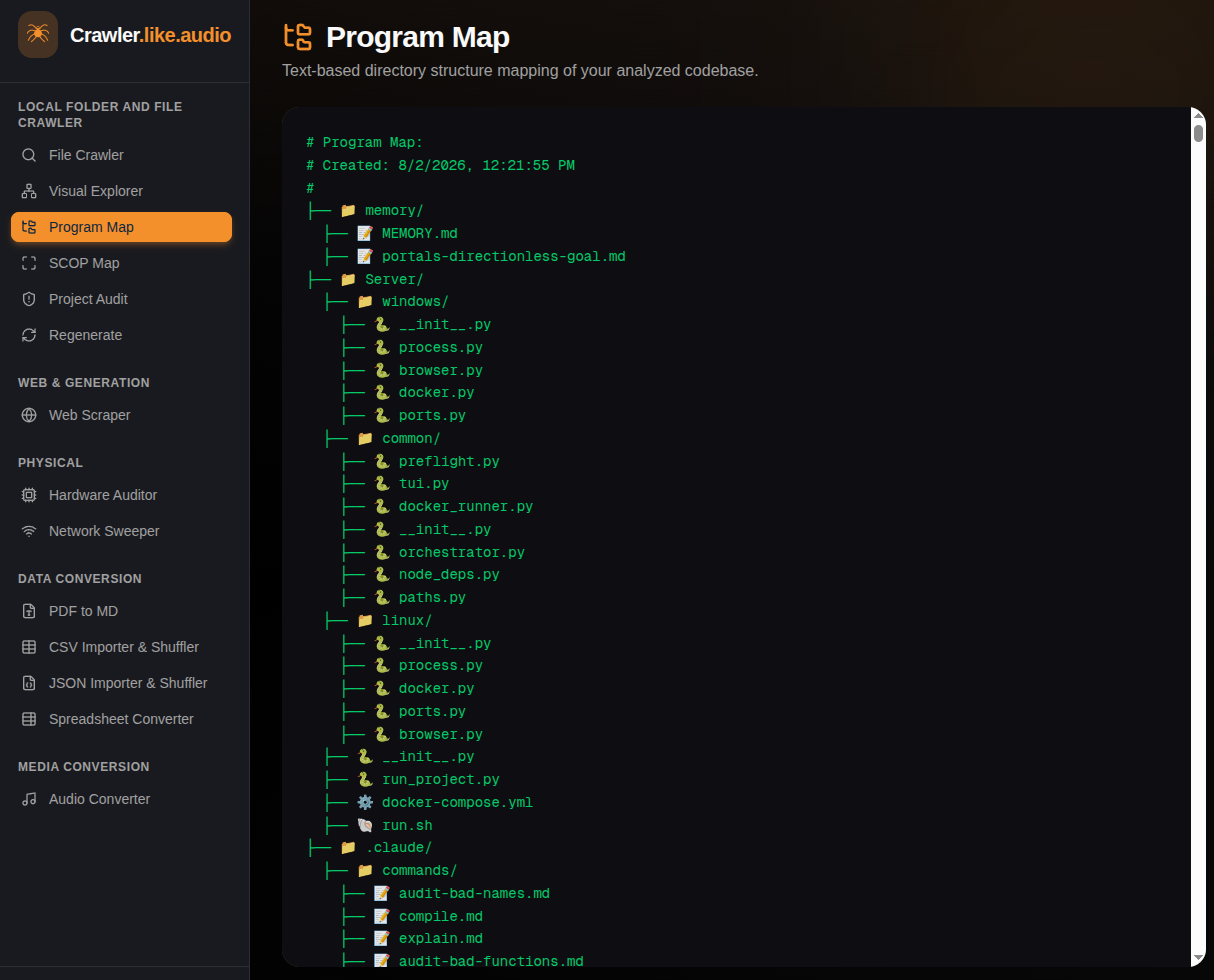
Visual Explorer: Taking the raw data from the File Crawler, this module uses React Flow to generate a highly interactive, drag-and-drop node graph. It visualizes your codebase architecture, mapping exactly how folders connect to files, and how those files branch into specific classes and functions.
Project Regenerator: Acting as the inverse of the File Crawler, the Regenerator takes an EVERYTHING.LOG file (whether generated by an AI or the crawler itself) and unpacks it. By selecting an empty destination folder, the utility uses the File System Access API to physically rebuild the folders and write the files back to your local disk.
Traditionally, network sweeps and hardware audits required native OS permissions. Crawler.Like.Audio leverages cutting-edge web standards to bring these capabilities into the sandbox.
Project Audit: A purely client-side security tool. Its secrets scanner uses advanced regex heuristics to hunt down exposed API keys, passwords, cryptographic tokens, and rogue .env variables. Additionally, the endpoint extractor maps out your app’s external dependencies by ripping through code to find hardcoded URLs, IP addresses, and API endpoints.
Hardware Auditor: This module hooks deeply into native hardware APIs to act as a physical peripheral scanner. It utilizes the WebUSB API to discover authorized USB devices, Web Bluetooth (BLE) for radar sweeps of nearby beacons and smart TVs, the Web Serial API for RS-232 devices and Arduinos, and WebRTC to silently index every connected camera and audio output.
Network Sweeper: A clever browser-based LAN scanner. Because browsers cannot open raw TCP/UDP sockets, this tool maps your local network (e.g., 192.168.1.x) using cross-origin HTTP fetches. By measuring precise timeout and connection-refused response times—a localized timing attack—it heuristically discovers routers, IoT devices, or local web servers.
The suite is rounded out by lightweight, privacy-first data extraction tools.
Web Scraper: Enter any public URL, and the scraper fetches the raw HTML. It then utilizes client-side parsing via Turndown to strip away web noise, instantly converting the page into clean, readable Markdown.
PDF to MD: A drag-and-drop local document extractor. Powered by a WebAssembly port of pdfjs-dist, it locally extracts text strings from PDFs and formats them into Markdown. Because everything happens in Wasm, sensitive documents are never uploaded to a cloud server.
Data Converters (CSV / JSON / Spreadsheet)
A powerful suite of data ingestion and shuffling utilities built with `papaparse` and `xlsx` (SheetJS).
* **CSV & JSON Importer/Shuffler:** Flatten or nest massive JSON objects, randomize CSV columns, and instantly export data.
* **Spreadsheet Converter:** Read natively complex spreadsheet binaries (`.xlsx`, `.csv`, `.ods`, `.numbers`) and convert them into clean formats, directly in the client.
### 12. 🎵 Audio Converter
A robust browser-side media encoder leveraging native Web Audio APIs and CDN-imported `lamejs`.
* **Universal Decode:** Drops any modern audio file (`.wav`, `.flac`, `.m4a`) to instantly decode its buffer.
* **Client-side Encoding:** Re-encodes the raw audio into an optimized `.mp3` file, relying strictly on your CPU’s client-side processing without uploading the audio file anywhere.
