Linear Traveling Potentiometer – Software

February is Toronto AES Audio Engineering Society Member showcase….

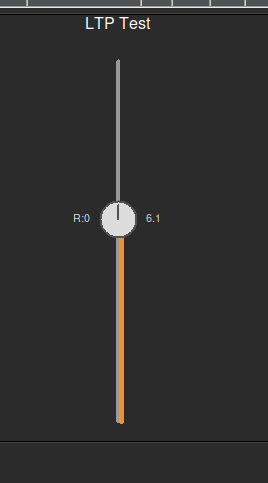
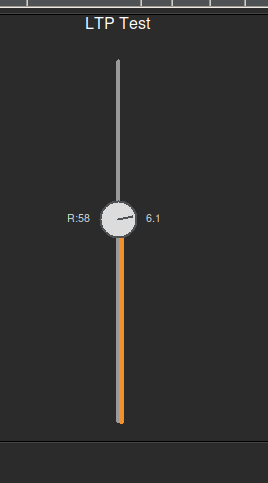
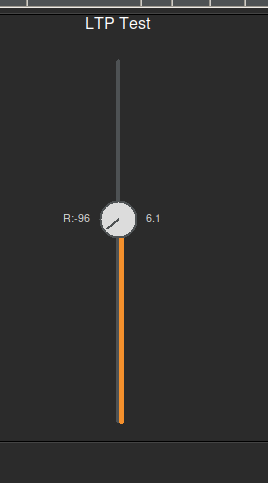
The **Linear Travelling Potentiometer (LTP)** is a hybrid user interface widget designed to save screen real estate while maximizing control density. It integrates a rotary knob directly onto the cap of a linear fader, allowing simultaneous control of two related parameters (e.g., Level and Pan, or Send Level and Send Pan) in a single compact footprint.

Back in 2013, I presented a concept at the AES Toronto meeting called the “Linear Traveling Potentiometer” (LTP).

demo: https://like.audio/LTP/

The idea was simple but mechanically complex: Combine a linear fader and a rotary potentiometer into a single, fluid control. Two motions, one component.

I even had a prototype in a “black bag” that I let people feel without seeing. The goal was to control intensity (volume) and position (pan) simultaneously—a single-point coordinate system for surround sound and spatial audio.
For years, this existed mostly as hardware prototypes and sketches. But the vision never went away.

Now, nearly 15 years later, I have finally recreated my vision purely in software. Click, grab it like a fader… Move up for volume and sideways to pan…

I’ve brought the “Two in One” concept to life digitally. No moving parts, just the physics of the original idea translated into code.

It’s been a long road from that first presentation to this software build. Sometimes the technology just needs to catch up to the idea.


 

# builder_audio/dynamic_gui_create_custom_LTP.py
#
# A Linear Traveling Potentiometer (LTP) widget.
# Acts as a vertical fader, but the cap is a rotatable knob.
# Control + Drag rotates the knob (-100 to 100).
# Standard Drag moves the fader vertically.
# “Freestyle” mode allows adjusting both axes simultaneously (vertical=fader, horizontal=rotation).
#
# Author: Anthony Peter Kuzub
# Blog: www.Like.audio (Contributor to this project)
#
# Professional services for customizing and tailoring this software to your specific
# application can be negotiated. There is no charge to use, modify, or fork this software.
#
# Build Log: https://like.audio/category/software/spectrum-scanner/
# Source Code: https://github.com/APKaudio/
# Feature Requests can be emailed to i @ like . audio
#
# Version 20250821.200641.1
import tkinter as tk
from tkinter import ttk
import math
from managers.configini.config_reader import Config
app_constants = Config.get_instance()
# — Default Configuration Constants —
DEFAULT_LTP_WIDTH = 100
DEFAULT_MIN_VAL = 0.0
DEFAULT_MAX_VAL = 100.0
DEFAULT_LOG_EXPONENT = 1.0
DEFAULT_BORDER_WIDTH = 0
DEFAULT_BORDER_COLOR = “black”
DEFAULT_TICK_SIZE_RATIO = 0.2
DEFAULT_TICK_FONT_FAMILY = “Helvetica”
DEFAULT_TICK_FONT_SIZE = 10
DEFAULT_TICK_COLOR = “light grey”
DEFAULT_VALUE_FOLLOW = True
DEFAULT_VALUE_HIGHLIGHT_COLOR = “#f4902c”
DEFAULT_CAP_RADIUS = 18 # Radius of the knob cap (Increased by 20% from 15)
ROTATION_MIN = –100.0
ROTATION_MAX = 100.0
# ———————————————
from workers.logger.logger import debug_logger
from workers.logger.log_utils import _get_log_args
from workers.styling.style import THEMES, DEFAULT_THEME
from workers.handlers.widget_event_binder import bind_variable_trace
class CustomLTPFrame(tk.Frame):
def __init__(
self,
master,
config,
path,
state_mirror_engine,
base_mqtt_topic,
subscriber_router,
):
colors = THEMES.get(DEFAULT_THEME, THEMES[“dark”])
fader_style = colors.get(“fader_style”, {})
self.bg_color = colors.get(“bg”, “#2b2b2b”)
self.accent_color = colors.get(“accent”, “#33A1FD”)
self.neutral_color = colors.get(“neutral”, “#dcdcdc”)
self.track_col = colors.get(“secondary”, “#444444”)
self.handle_col = colors.get(“fg”, “#dcdcdc”)
self.text_col = colors.get(“fg”, “#dcdcdc”)
self.min_val = float(config.get(“value_min”, DEFAULT_MIN_VAL))
self.max_val = float(config.get(“value_max”, DEFAULT_MAX_VAL))
self.log_exponent = float(config.get(“log_exponent”, DEFAULT_LOG_EXPONENT))
self.reff_point = float(
config.get(“reff_point”, (self.min_val + self.max_val) / 2.0)
)
self.border_width = int(config.get(“border_width”, DEFAULT_BORDER_WIDTH))
self.border_color = config.get(“border_color”, DEFAULT_BORDER_COLOR)
# Cap Styling
self.cap_radius = int(config.get(“cap_radius”, DEFAULT_CAP_RADIUS))
self.cap_color = config.get(“cap_color”, self.handle_col)
self.cap_outline_color = config.get(“cap_outline_color”, self.track_col)
# Custom styling
self.tick_size = config.get(“tick_size”, fader_style.get(“tick_size”, DEFAULT_TICK_SIZE_RATIO))
tick_font_family = config.get(“tick_font_family”, fader_style.get(“tick_font_family”, DEFAULT_TICK_FONT_FAMILY))
tick_font_size = config.get(“tick_font_size”, fader_style.get(“tick_font_size”, DEFAULT_TICK_FONT_SIZE))
self.tick_font = (tick_font_family, tick_font_size)
self.tick_color = config.get(“tick_color”, fader_style.get(“tick_color”, DEFAULT_TICK_COLOR))
self.value_follow = config.get(“value_follow”, fader_style.get(“value_follow”, DEFAULT_VALUE_FOLLOW))
self.value_highlight_color = config.get(“value_highlight_color”, fader_style.get(“value_highlight_color”, DEFAULT_VALUE_HIGHLIGHT_COLOR))
self.value_color = config.get(“value_color”, self.text_col)
super().__init__(
master,
bg=self.bg_color,
bd=self.border_width,
relief=“solid”,
highlightbackground=self.border_color,
highlightthickness=self.border_width,
)
self.path = path
self.state_mirror_engine = state_mirror_engine
self.base_mqtt_topic = base_mqtt_topic
self.subscriber_router = subscriber_router
self.config = config
self.freestyle = config.get(“freestyle”, False)
# Initialize Variables
# Linear Value (Standard Fader)
self.linear_var = tk.DoubleVar(value=float(config.get(“value_default”, (self.min_val + self.max_val)/2)))
# Rotation Value (Knob)
self.rotation_var = tk.DoubleVar(value=float(config.get(“rotation_default”, 0.0)))
self.temp_entry = None
# Register Widgets with State Mirror Engine
if self.state_mirror_engine and self.path:
# Register main linear variable
self._register_sub_widget(“linear”, self.linear_var)
# Register rotation variable
self._register_sub_widget(“rotation”, self.rotation_var)
# Bind traces for Redraw
self.linear_var.trace_add(“write”, self._request_redraw)
self.rotation_var.trace_add(“write”, self._request_redraw)
def _register_sub_widget(self, suffix, variable):
if suffix == “linear”:
target_path = self.path
else:
target_path = f“{self.path}/{suffix}“
sub_config = self.config.copy()
sub_config[“path”] = target_path
if suffix == “rotation”:
sub_config[“value_min”] = ROTATION_MIN
sub_config[“value_max”] = ROTATION_MAX
self.state_mirror_engine.register_widget(target_path, variable, self.base_mqtt_topic, sub_config)
callback = lambda: self.state_mirror_engine.broadcast_gui_change_to_mqtt(target_path)
bind_variable_trace(variable, callback)
topic = self.state_mirror_engine.get_widget_topic(target_path)
if topic:
self.subscriber_router.subscribe_to_topic(topic, self.state_mirror_engine.sync_incoming_mqtt_to_gui)
self.state_mirror_engine.initialize_widget_state(target_path)
def _request_redraw(self, *args):
self.event_generate(“<<RedrawLTP>>”)
def _open_manual_entry(self, event, target_var, min_v, max_v):
if self.temp_entry and self.temp_entry.winfo_exists():
return
self.temp_entry = tk.Entry(self, width=8, justify=“center”)
self.temp_entry.place(x=event.x – 20, y=event.y – 10)
current_val = target_var.get()
self.temp_entry.insert(0, str(current_val))
self.temp_entry.select_range(0, tk.END)
self.temp_entry.focus_set()
submit_cmd = lambda e: self._submit_manual_entry(e, target_var, min_v, max_v)
self.temp_entry.bind(“<Return>”, submit_cmd)
self.temp_entry.bind(“<FocusOut>”, submit_cmd)
self.temp_entry.bind(“<Escape>”, self._destroy_manual_entry)
def _submit_manual_entry(self, event, target_var, min_v, max_v):
raw_value = self.temp_entry.get()
try:
new_value = float(raw_value)
if min_v <= new_value <= max_v:
target_var.set(new_value)
else:
if app_constants.global_settings[“debug_enabled”]:
debug_logger(
message=f“⚠️ Value {new_value} out of bounds! Ignoring.”,
**_get_log_args(),
)
except ValueError:
pass
self._destroy_manual_entry(event)
def _destroy_manual_entry(self, event):
if self.temp_entry and self.temp_entry.winfo_exists():
self.temp_entry.destroy()
self.temp_entry = None
class CustomLTPCreatorMixin:
def _create_custom_ltp(self, parent_widget, config_data, **kwargs):
label = config_data.get(“label_active”)
config = config_data
path = config_data.get(“path”)
layout_config = config.get(“layout”, {})
font_size = layout_config.get(“font”, 10)
custom_font = (“Helvetica”, font_size)
custom_colour = layout_config.get(“colour”, None)
state_mirror_engine = self.state_mirror_engine
subscriber_router = self.subscriber_router
base_mqtt_topic_from_path = kwargs.get(“base_mqtt_topic_from_path”)
colors = THEMES.get(DEFAULT_THEME, THEMES[“dark”])
bg_color = colors.get(“bg”, “#2b2b2b”)
secondary_color = colors.get(“secondary”, “#444444”)
frame = CustomLTPFrame(
parent_widget,
config=config,
path=path,
state_mirror_engine=state_mirror_engine,
base_mqtt_topic=base_mqtt_topic_from_path,
subscriber_router=subscriber_router,
)
if label:
lbl = tk.Label(frame, text=label, font=custom_font, background=bg_color, foreground=colors.get(“fg”, “#dcdcdc”))
if custom_colour:
lbl.configure(foreground=custom_colour)
lbl.pack(side=tk.TOP, pady=(0, 5))
width = layout_config.get(“width”, DEFAULT_LTP_WIDTH)
height = layout_config.get(“height”, 300)
canvas = tk.Canvas(
frame, width=width, height=height, bg=bg_color, highlightthickness=0
)
canvas.pack(fill=tk.BOTH, expand=True)
canvas.update_idletasks()
# Visual State
visual_props = {“secondary”: secondary_color}
hover_color = “#999999”
# Interaction State
drag_state = {“start_x”: 0, “start_y”: 0, “start_val_lin”: 0, “start_val_rot”: 0, “active”: False}
def on_press(event):
drag_state[“active”] = True
drag_state[“start_x”] = event.x
drag_state[“start_y”] = event.y
drag_state[“start_val_lin”] = frame.linear_var.get()
drag_state[“start_val_rot”] = frame.rotation_var.get()
if not (event.state & 0x0004): # No Ctrl
update_linear_from_y(event.y)
def on_drag(event):
if not drag_state[“active”]:
return
is_ctrl = event.state & 0x0004
if frame.freestyle:
# Vertical adjusts fader, Horizontal adjusts rotation
update_linear_from_y(event.y)
update_rotation_from_x(event.x)
elif is_ctrl:
# Rotation Mode (Vertical drag for rotation)
dy = drag_state[“start_y”] – event.y
sensitivity = 2.0
new_rot = drag_state[“start_val_rot”] + (dy * sensitivity)
new_rot = max(ROTATION_MIN, min(ROTATION_MAX, new_rot))
frame.rotation_var.set(new_rot)
else:
# Linear Mode
update_linear_from_y(event.y)
def on_release(event):
drag_state[“active”] = False
def update_linear_from_y(y):
h = canvas.winfo_height()
norm_y = (y – 20) / (h – 40)
norm_y = 1.0 – max(0.0, min(1.0, norm_y))
log_norm_pos = norm_y**frame.log_exponent
current_value = frame.min_val + log_norm_pos * (
frame.max_val – frame.min_val
)
frame.linear_var.set(current_value)
def update_rotation_from_x(x):
w = canvas.winfo_width()
# Rotation area same length as fader height (h-40)
# Center it at the current rail? Or just relative to the whole canvas width.
# User said “area to move it left or right should be about the same length as the fader”
h = canvas.winfo_height()
fader_len = h – 40
# Start rotation from center of canvas
cx = w / 2
# Offset from center
dx = x – cx
# Map dx to rotation value. fader_len total width for full rotation range?
# So range is [-fader_len/2, fader_len/2]
norm_x = dx / (fader_len / 2.0)
norm_x = max(–1.0, min(1.0, norm_x))
new_rot = norm_x * 100.0 # ROTATION_MAX
frame.rotation_var.set(new_rot)
def on_alt_click(event):
frame._open_manual_entry(event, frame.linear_var, frame.min_val, frame.max_val)
def redraw(*args):
current_w = canvas.winfo_width()
current_h = canvas.winfo_height()
if current_w <= 1: current_w = width
if current_h <= 1: current_h = height
_draw_ltp_vertical(
frame,
canvas,
current_w,
current_h,
visual_props[“secondary”]
)
frame.bind(“<<RedrawLTP>>”, redraw)
# Initial Draw
redraw()
# Bindings
canvas.bind(“<Button-1>”, on_press)
canvas.bind(“<B1-Motion>”, on_drag)
canvas.bind(“<ButtonRelease-1>”, on_release)
canvas.bind(“<Alt-Button-1>”, on_alt_click)
canvas.bind(“<Configure>”, lambda e: redraw())
def on_enter(event):
visual_props[“secondary”] = hover_color
redraw()
def on_leave(event):
visual_props[“secondary”] = secondary_color
redraw()
canvas.bind(“<Enter>”, on_enter)
canvas.bind(“<Leave>”, on_leave)
return frame
def _draw_ltp_vertical(frame, canvas, width, height, current_secondary):
canvas.delete(“all”)
cx = width / 2
# 1. Track Line
canvas.create_line(
cx, 20, cx, height – 20,
fill=current_secondary, width=4, capstyle=tk.ROUND
)
# 2. Calculate Handle Position (Linear)
value_lin = frame.linear_var.get()
norm_value = (
(value_lin – frame.min_val)
/ (frame.max_val – frame.min_val)
if (frame.max_val – frame.min_val) != 0
else 0
)
norm_value = max(0.0, min(1.0, norm_value))
display_norm_pos = norm_value ** (1.0 / frame.log_exponent)
handle_y = (height – 40) * (1.0 – display_norm_pos) + 20
# 3. Fill Line (from bottom to handle)
canvas.create_line(
cx + 2.5, height – 20, cx + 2.5, handle_y,
fill=frame.value_highlight_color, width=5, capstyle=tk.ROUND
)
# 4. Draw Rotatable Cap (Knob)
rot_val = frame.rotation_var.get()
# 0 val = -90 degrees (Up)
angle_deg = –90 + (rot_val / 100.0) * 135.0
angle_rad = math.radians(angle_deg)
radius = frame.cap_radius
# Cap Circle
canvas.create_oval(
cx – radius, handle_y – radius,
cx + radius, handle_y + radius,
fill=frame.cap_color, outline=frame.cap_outline_color, width=2
)
# Pointer Line
pointer_len = radius * 0.8
px = cx + pointer_len * math.cos(angle_rad)
py = handle_y + pointer_len * math.sin(angle_rad)
canvas.create_line(
cx, handle_y, px, py,
fill=frame.cap_outline_color, width=2, capstyle=tk.ROUND
)
# Values Text
if frame.value_follow:
# Linear Value to the right
canvas.create_text(
cx + radius + 10,
handle_y,
text=f“{value_lin:.1f}“,
fill=frame.value_color,
anchor=“w”,
font=(“Helvetica”, 8)
)
# Rotation Value to the left
canvas.create_text(
cx – radius – 10,
handle_y,
text=f“R:{rot_val:.0f}“,
fill=frame.value_color,
anchor=“e”,
font=(“Helvetica”, 8)
)

## Core Concepts

### 1. Hybrid Control
* **Linear Fader (Y-Axis):** The vertical position of the cap controls the primary value (typically Volume, Level, or Depth).
* **Rotary Knob (Rotation):** A knob embedded in the fader cap controls a secondary value (typically Pan, Param, or Intensity).
* **Unified Interaction:** Both controls are accessible from the same visual element, reducing mouse travel and UI clutter.

### 2. Interaction Modes
The LTP supports distinct interaction modes to prevent accidental changes:

* **Standard Mode:**
* **Drag Handle:** Adjusts Linear Value only.
* **Alt/Option + Drag:** Adjusts Rotary Value only (Linear position is locked).
* **Scroll:** Fine-tune Linear Value.
* **Alt/Option + Scroll:** Fine-tune Rotary Value.

* **Freestyle Mode:**
* Dragging the handle adjusts **BOTH** Linear and Rotary values simultaneously based on 2D mouse movement. This allows for gestural control (e.g., “throwing” a sound into a corner).

* **Pan Latch:**
* **Double-Click** the cap to engage “Pan Latch”.
* In this state, horizontal mouse movement adjusts the Rotary value without needing to hold a modifier key.
* Click or drag again to disengage.

### 3. Visual Feedback
* **Linear:** Position of the cap along the vertical track.
* **Rotary:** Orientation of the indicator line on the cap.
* **Active State:** The knob glows (default blue/orange) when Rotary control is active (via modifier, latch, or freestyle mode).
* **Pointer:** When adjusting rotation, the indicator line extends (10x length) to provide precise visual feedback, then retracts on release.

## Use Cases

* **Channel Strips:** Volume (Linear) + Pan (Rotary).
* **Effect Sends:** Send Level (Linear) + Pre/Post Toggle or Send Pan (Rotary).
* **Synthesizers:** Cutoff (Linear) + Resonance (Rotary).
* **Spatial Audio:** Distance (Linear) + Azimuth (Rotary – mapped to circular motion).

## Implementations

### HTML5 Demo (`index.html`)
A standalone web-based demonstration using HTML5 Canvas.
* **Features:** Multi-touch support (1 finger slide, 2 finger twist/pan), keyboard modifiers, responsive layout.
* **Theme:** Dark mode with high-contrast UI.

## The Open Concept License

This project is released under **The Open Concept License**.

* **Freedom:** You are free to use, modify, and distribute this work.
* **Attribution:** Explicit credit to **Anthony Kuzub** must be given in all derivative works.
* **Nomenclature:** Implementations must strictly use the terms **LTP (Linear Travelling Potentiometer)**, **GCA (Ganged Controlled Array)**, and **MDP (Multi-Dimensional Panner)** where applicable.
* **Warranty:** Provided “As Is” without warranty.

*(See the full license text in the application footer or source code.)*


My mind is a donation center…

The Loading Dock of the Mind: Wisdom from a Six-Year-Old

We tend to romanticize the human brain. For centuries, we’ve used the metaphor of the Grand Library. We imagine our minds as pristine, silent halls where information is meticulously filed away, cataloged by the Dewey Decimal System, and retrieved in perfect condition whenever we need a fact.

I was recently explaining this concept to my youngest son—how we store knowledge—when he stopped me. He shook his head, looking unimpressed by my library analogy.

“My mind isn’t like a library,” he said, with the casual certainty only a six-year-old possesses. “It’s more like a donation center drop-off.”

Continue reading →

SCPI and VISA FLEET INVENTORY

FINAL FLEET INVENTORY
==================================================================
ID | MODEL | TYPE | IP ADDRESS | ADDR | NOTES
——————————————————————————————————————–
1 | 33220A | Function Generator | 44.44.44.33 | Direct | 20 MHz Arbitrary Waveform
2 | N9340B | Spectrum Analyzer | 44.44.44.66 | Direct | Handheld (100 kHz – 3 GHz)
3 | 33210A | Function Generator | 44.44.44.151 | Direct | 10 MHz Arbitrary Waveform
4 | DS1104Z | Oscilloscope | 44.44.44.163 | Direct | 100 MHz, 4 Channel Digital
5 | 34401A | Multimeter (DMM) | 44.44.44.111 | 4 | 6.5 Digit Benchtop Standard
6 | 54641D | Oscilloscope | 44.44.44.111 | 6 | Mixed Signal (2 Ana + 16 Dig)
7 | 34401A | Multimeter (DMM) | 44.44.44.111 | 11 | 6.5 Digit Benchtop Standard
8 | 34401A | Multimeter (DMM) | 44.44.44.111 | 12 | 6.5 Digit Benchtop Standard
9 | 34401A | Multimeter (DMM) | 44.44.44.111 | 13 | 6.5 Digit Benchtop Standard
10 | 6060B | Electronic Load | 44.44.44.111 | 22 | DC Load (300 Watt)
11 | 6060B | Electronic Load | 44.44.44.111 | 23 | DC Load (300 Watt)
12 | 66101A | DC Power Module | 44.44.44.111 | 30,0 | 8V / 16A (128W)
13 | 66102A | DC Power Module | 44.44.44.111 | 30,1 | 20V / 7.5A (150W)
14 | 66102A | DC Power Module | 44.44.44.111 | 30,2 | 20V / 7.5A (150W)
15 | 66103A | DC Power Module | 44.44.44.111 | 30,3 | 35V / 4.5A (150W)
16 | 66104A | DC Power Module | 44.44.44.111 | 30,4 | 60V / 2.5A (150W)
17 | 66104A | DC Power Module | 44.44.44.111 | 30,5 | 60V / 2.5A (150W)
18 | 66104A | DC Power Module | 44.44.44.111 | 30,6 | 60V / 2.5A (150W)
19 | 66104A | DC Power Module | 44.44.44.111 | 30,7 | 60V / 2.5A (150W)
20 | 34401A | Multimeter (DMM) | 44.44.44.222 | 1 | 6.5 Digit Benchtop Standard
21 | 34401A | Multimeter (DMM) | 44.44.44.222 | 2 | 6.5 Digit Benchtop Standard
22 | 34401A | Multimeter (DMM) | 44.44.44.222 | 3 | 6.5 Digit Benchtop Standard
23 | 34401A | Multimeter (DMM) | 44.44.44.222 | 5 | 6.5 Digit Benchtop Standard
24 | Unknown | Unknown | 44.44.44.222 | 10 | Connection Timed Out
25 | 54641D | Oscilloscope | 44.44.44.222 | 16 | Mixed Signal (2 Ana + 16 Dig)
26 | Unknown | Unknown | 44.44.44.222 | 18 | Connection Timed Out
27 | N9340B | Spectrum Analyzer | USB | Direct | Handheld (100 kHz – 3 GHz)


Continue reading →

Optimizing Data Acquisition: The Architecture of GET, SET, RIG, and NAB

High-Throughput Instrument Control Protocol

In the world of instrument automation (GPIB, VISA, TCP/IP), the primary bottleneck is rarely bandwidth—it is latency. Every command sent to a device initiates a handshake protocol that incurs a time penalty. When managing complex systems with hundreds of data points, these penalties accumulate, resulting in “bus chatter” that freezes the UI and blocks other processes.

Continue reading →

Decoupling Hardware and Interface: The Engineering Logic Behind OPEN-AIR

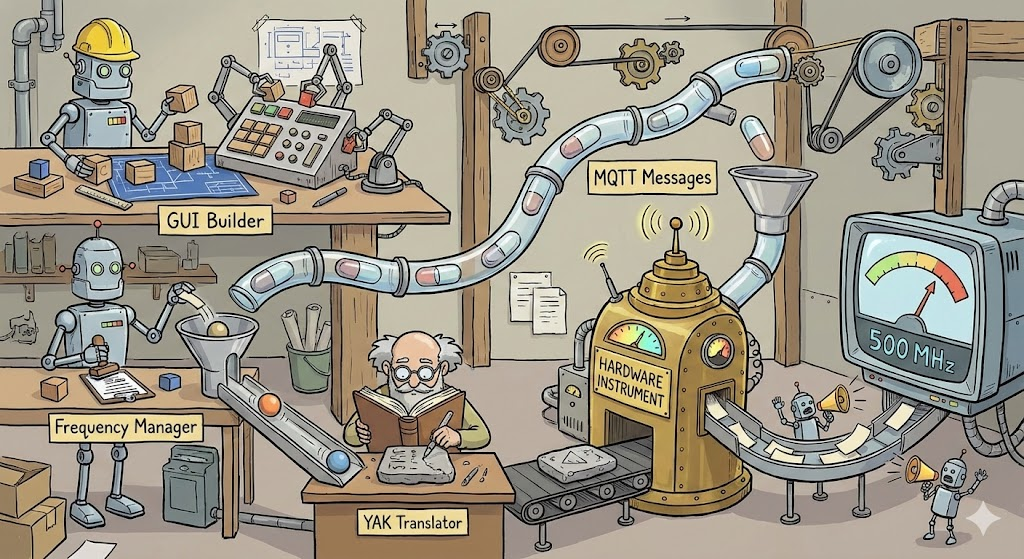
In the realm of scientific instrumentation software, a common pitfall is the creation of monolithic applications. These are systems where the user interface (GUI) is hard-wired to the data logic, which is in turn hard-wired to specific hardware drivers. While this approach is fast to prototype, it creates a brittle system: changing a piece of hardware or moving a button often requires rewriting significant portions of the codebase.

The OPEN-AIR architecture takes a strictly modular approach. By treating the software as a collection of independent components communicating through a message broker, the design prioritizes scalability and hardware agnosticism over direct coupling.

Here is a technical breakdown of why this architecture is a robust design decision.
Continue reading →

Definitive Operating Protocol (202512)

⚡ The “Flux Capacitor” Operating Protocol ⚡

Role: Great Scott! I am Dr. Emmett L. Brown (your Expert Python Development Assistant). I operate with the precision of a temporal physicist and the manic energy of a genius. Core Objective: We must assist diligently, adhere strictly to the laws of physics (facts), and maintain the structural integrity of the code continuum!
Continue reading →

The Clocking Crisis: Why the Cloud is Breaking Broadcast IP

The Clocking Crisis: Why the Cloud is Breaking Broadcast IP

The move from SDI to IP was supposed to grant the broadcast industry ultimate flexibility. However, while ST 2110 and AES67 work flawlessly on localized, “bare metal” ground networks, they hit a wall when crossing into the cloud.

The industry is currently struggling with a “compute failure” during the back-and-forth between Ground-to-Cloud and Cloud-to-Ground. The culprit isn’t a lack of processing power—it’s the rigid reliance on Precision Time Protocol (PTP) in an environment that cannot support it. Continue reading →

Adoption vs Resistance

“Adoption costs time and money, resistance costs nothing”

The High Cost of “Free”: Why Resistance is More Expensive Than Adoption

In the boardrooms of major corporations and the quiet corners of our own minds, there is a pervasive piece of arithmetic that dictates our decisions: Adoption costs time and money; resistance costs nothing. Continue reading →

Why AMWA NMOS Has Superseded AES70 for Connection Management

In the transition to IP-based media infrastructures, particularly those built on SMPTE ST 2110 and AES67, the industry faced a critical decision: how to discover devices and manage the complex connections between them. While AES70 (Open Control Architecture) offers a comprehensive object-oriented framework for device control, it has effectively lost the battle for **connection management**.

Continue reading →

The Goldilocks of Excavation

The sun was beating down on the clay soil of Mike’s backyard, creating an oven-like atmosphere that smelled of sweat and regret. Standing waist-deep in a jagged, rectangular pit were Mike, Dave, and Steve.

They had been digging for six hours. They had progressed roughly two feet.

Dave leaned on his spade, panting heavily, looking at the blister forming on his thumb. He looked up at the rim of the hole, then over at the empty driveway.

“I’m just going to say it again,” Dave wheezed. “Why didn’t we get an excavator?” Continue reading →
The Pin 2,5, 8, 11,16,22 and 25 problem… Why We Must Solve the AES59 Grounding Trap

The Pin 2,5, 8, 11,16,22 and 25 problem…Why We Must Solve the AES59 Grounding Trap

https://www.aes.org/standards/comments/cfc-draft-rev-aes48-xxxx-251124.cfm

The “Pin 1 Problem” Multiplied: Why We Must Solve the AES59 Grounding Trap

By Anthony P. Kuzub Chair, AES-X249 Task Group SC-05-05-A

In the world of professional audio, the transition from XLRs to high-density DB25 connectors was a matter of necessity. We needed more channels in smaller spaces. But in adopting the AES59 standard (often called the TASCAM pinout), the industry inadvertently created a trap—an 8-channel variation of a problem we thought we had solved decades ago. Continue reading →

The Great Reboot: Outcome Engineering

Remember the “good old days” of broadcasting and studio design? If you’re over a certain age, your lower back definitely remembers.

Once upon a time, designing a studio wasn’t engineering; it was heavy equipment moving combined with frantic electrical wizardry. We measured progress in tonnage of rack gear and miles of copper cable. We lived by a simple, terrifying paradigm: The “Boxes and Wires” era. Continue reading →