
CMDP: Circular Motion Displacement Potentiometer
DEMO: http://like.audio/CMDP
# CMDP: Circular Motion Displacement Potentiometer
Overview
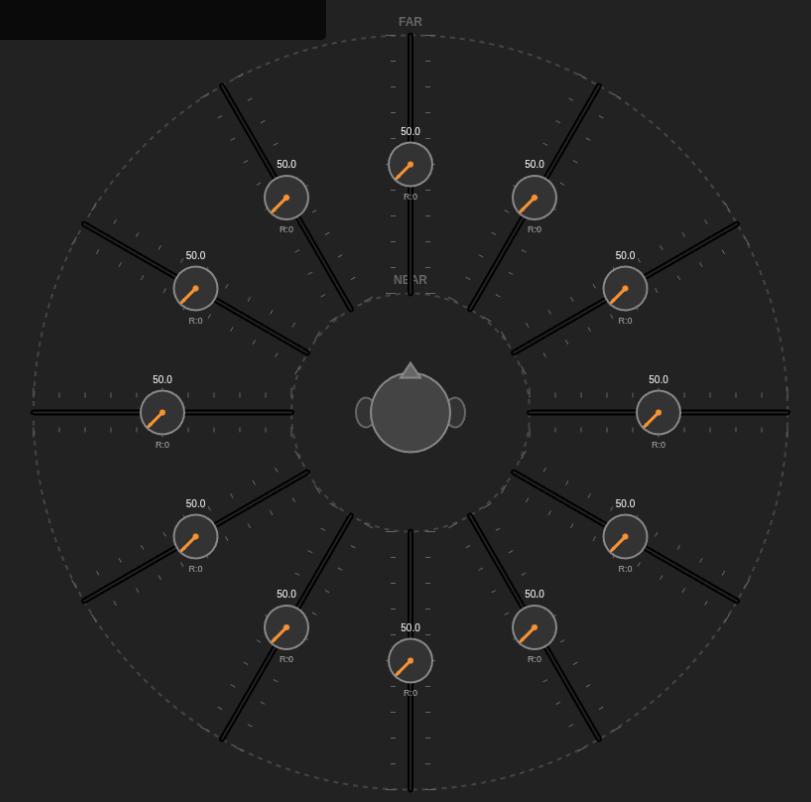
The **Circular Motion Displacement Potentiometer (CMDP)** is a novel user interface concept designed for spatial audio mixing, microphone array management, and multidimensional sound control. It combines the precision of linear faders with the intuitive spatial organization of a polar coordinate system, allowing users to visualize and manipulate sound sources in a 360-degree field.
## Core Concepts
The CMDP interface consists of a radial array of “Linear Travelling Potentiometers” (LTPs) anchored around a central point (representing the listener or array center). Each unit serves three distinct control functions simultaneously:
### 1. Azimuth (Circular Position)
* **Representation:** The angle of the fader unit relative to the center.
* **Function:** Defines the directionality of the sound source or microphone in the horizontal plane (0° to 360°).
* **Interaction:** Users can move the entire fader unit around the circular track (Alt+Drag), allowing for dynamic panning or reconfiguring of the array geometry.
### 2. Depth / Distance (Linear Travel)
* **Representation:** The linear position of the fader cap along the track, moving between the **NEAR** (inner) and **FAR** (outer) boundaries.
* **Function:** Represents the **Distance** or **Depth** of the source.
* *In Mixing:* Controls the proximity effect, reverb send level, or pre-delay to simulate distance.
* *In Micing:* Visualizes the physical distance of a microphone from the center point (e.g., distinguishing close spot mics from distant room mics).
* **Interaction:** Dragging the fader along the track adjusts this depth parameter.
### 3. Intensity (Rotary Knob)
* **Representation:** A rotary knob located on the fader cap itself, featuring a color-coded intensity sweep.
* **Function:** Controls the **Intensity**, **Gain**, or **Volume** of the channel. This allows independent control of a source’s level regardless of its distance or position.
* **Interaction:** Rotating the knob (Right-Drag or Scroll) adjusts the gain without affecting the spatial positioning.
## Applications
### Multidimensional & Spatial Audio
In formats like Dolby Atmos, Ambisonics, or generic binaural rendering, mixing requires more than just left/right panning. The CMDP provides a native “Bird’s Eye View” of the soundstage.
* **Object Placement:** Intuitively place sound objects at specific angles and distances.
* **Trajectory Automation:** Visualize and automate complex circular movements or fly-bys.
### Surround Sound Microphone Arrays
When managing complex recording setups (e.g., for orchestra or film scoring), the physical arrangement of microphones is critical.
* **Visualization:** The CMDP acts as a virtual map of the recording floor.
* *Example:* A central “Decca Tree” can be represented by faders at -30°, 0°, and +30° near the center.
* *Example:* “Surround” or “Hall” mics can be placed at the rear angles on the “FAR” perimeter.
* **Ganged Control:** Groups of mics (e.g., the front trio) can be linked and adjusted relative to their distance from the conductor.
## Prototype Controls (Python/HTML5)
* **Left-Drag:** Adjust **Linear Level** (Depth/Distance).
* *Note:* Dragging OUT (towards Far) decreases the value (simulating signal attenuation over distance).
* **Right-Drag:** Adjust **Rotary Knob** (Intensity/Gain).
* **Alt + Left-Drag (or Middle-Drag):** Move the fader unit along the **Circular** path (Azimuth).
* **Ctrl + Scroll:** Rotate the fader widget orientation.
—
*Concept and Design by Anthony Kuzub*
*The Open Concept License applies.*